















Why Won’t My iPhone Charge Past 80%? Understanding Battery Protection Features
Many iPhone users experience the same confusing situation:
You connect your charger before going to bed, wake up in the morning, and notice your iPhone battery is still stuck at 80%.
At first, it may seem like a problem with the charging cable, charger, or battery.
However, in many cases, your iPhone is working exactly as Apple designed.
The reason your iPhone won’t charge past 80% is usually related to battery protection features such as Optimized Battery Charging, charging limits, temperature control, or battery management settings.
Apple introduced these features because lithium-ion batteries naturally experience chemical aging. Keeping a battery at 100% charge for long periods creates additional stress, especially when combined with heat.
Instead of constantly charging to maximum capacity, modern iPhones intelligently manage charging behavior to extend battery lifespan.
However, there are also situations where an iPhone stopping at 80% indicates another issue, such as:
A damaged charging cable
Poor-quality charging accessories
Excessive battery temperature
Software problems
Battery degradation
Understanding the difference can help you solve the problem quickly and protect your device.
Why Does iPhone Stop Charging at 80%?
1. Optimized Battery Charging Is Enabled
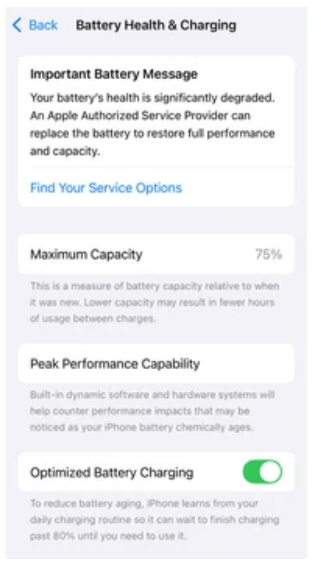
The most common reason your iPhone stops charging at 80 percent is Apple’s Optimized Battery Charging feature.
This function learns your daily charging habits and adjusts charging speed automatically.
For example, if you usually charge your iPhone overnight, the device may charge normally until around 80%, then pause charging.
Before your usual wake-up time, it completes the remaining charge.
This reduces the amount of time your battery spends fully charged, helping slow chemical aging.
For users who keep their phones for several years, this feature can help maintain battery capacity longer.
How to Turn Off Optimized Battery Charging
If you need your iPhone to charge fully immediately:
Go to:
Settings → Battery → Battery Health & Charging → Optimized Battery Charging
Then disable the option.
Keep in mind that turning this feature off may slightly increase battery wear over time because the battery spends more time at higher charge levels.
2. iPhone 15 and Later Models Have Charging Limits
Starting with newer iPhone models, Apple introduced additional charging control options.
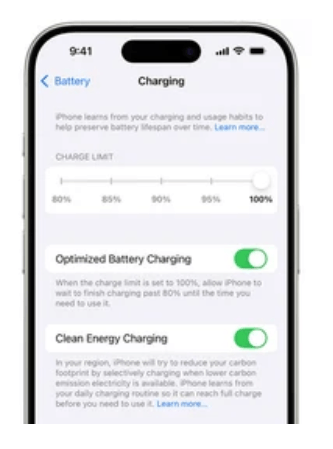
On iPhone 15 models and newer, users can set a charging limit.
For example:
80%
85%
90%
95%
100%
If your charging limit is set to 80%, your iPhone will intentionally stop charging there.
This does not mean your charger or cable is damaged.
It is simply a battery management setting.
To check:
Settings → Battery → Charging
Review your selected charging limit.
3. Your iPhone May Be Too Hot While Charging
Temperature is another major reason an iPhone may stop charging beyond 80%.
Lithium-ion batteries are sensitive to heat.
When the internal temperature becomes too high, iOS automatically reduces charging speed or temporarily pauses charging to protect battery health.
Common causes include:
Charging in direct sunlight
Using a thick phone case during charging
Playing games while charging
Using low-quality chargers that generate excess heat
How to Reduce Charging Temperature
Try these solutions:
Remove thick protective cases while charging
Keep your iPhone away from heat sources
Avoid heavy gaming during charging
Use reliable USB-C power adapters and charging cables
A high-quality cable with proper power management can help maintain stable charging performance.
4. Damaged or Low-Quality Charging Cable
Although many people blame the iPhone battery first, the charging cable is often the actual problem.
A damaged cable may still show the charging icon but fail to deliver stable power.
Common cable problems include:
Broken internal wires
Weak connector joints
Poor-quality materials
Unstable power delivery
Loose connections
This is especially common with inexpensive cables that use thin conductors and weak strain relief.
A premium USB-C charging cable for iPhone should provide:
Stable power transmission
Reinforced connectors
Durable outer protection
Proper charging protocol support
For example, newer iPhone models using USB-C require cables designed for modern charging standards.
A USB-C cable is not automatically a fast charging cable.
The internal structure determines performance.
How to Choose the Best iPhone Charging Cable for Battery Health
Choosing the correct cable is just as important as choosing the correct charger.
A reliable iPhone charging cable should include several important features.
MFi Certification for iPhone Compatibility
For Lightning-based iPhones, MFi certification remains an important quality indicator.
MFi-certified cables meet Apple’s requirements for compatibility and safety.
They help prevent:
Charging interruptions
Accessory compatibility errors
Poor charging performance
USB-C Fast Charging Support
Modern iPhones such as iPhone 15, iPhone 16, and newer models use USB-C charging.
A quality USB-C cable should support:
USB Power Delivery (PD)
Stable current output
Fast charging performance
Reliable data transfer
For users searching for:
“best USB-C cable for iPhone 15 fast charging“
or
“USB-C charging cable for iPhone 16”
the cable specification matters more than appearance.
Durable Construction for Daily Use
Charging cables experience thousands of bending cycles throughout their lifetime.
A durable cable should use:
Braided nylon exterior
Reinforced connector design
Flexible internal structure
Strong strain relief
These features reduce damage caused by:
Repeated bending
Pulling
Travel use
Desk charging

Engineering Case Study: Designing a Durable iPhone Charging Cable for Daily Users
A European consumer electronics distributor contacted OSKO after receiving complaints about high cable replacement rates.
Their customers mainly used iPhone charging cables in offices, vehicles, and travel environments.
The original cables had three major problems:
- Connector damage after several months
- Unstable charging connection
- Outer jacket cracking after repeated bending
From an engineering perspective, OSKO analyzed the failure points and redesigned the cable structure.
The solution included:
Improved copper conductor design
Reinforced connector stress areas
More flexible braided nylon jacket
Optimized internal protection layers
After testing, the upgraded cable showed significantly improved durability during repeated bending tests.
For procurement teams and retailers, cable reliability directly affects customer satisfaction and return rates.
A charging cable is not only an accessory — it is a critical part of the charging system.
Practical Tips to Protect iPhone Battery During Charging
Use Reliable Charging Accessories
Using certified chargers and cables helps maintain stable power delivery.
Avoid extremely cheap cables with unknown specifications.
A low-quality cable may cause:
Slow charging
Connection drops
Excess heat
Reduced charging efficiency
Avoid Extreme Temperatures
The ideal charging environment is moderate room temperature.
Avoid charging your iPhone:
Inside a hot car
Under direct sunlight
Near heating devices
Maintain Healthy Charging Habits
You do not need to avoid charging to 100%.
Modern iPhones are designed to manage battery charging automatically.
However:
Avoid unnecessary overheating
Use optimized charging features
Replace damaged cables quickly
Final Thoughts: Why Your iPhone Stops at 80%
If your iPhone won’t charge past 80%, the cause is usually not a serious hardware problem.
In many cases, it is simply:
Optimized Battery Charging
Charging limits
Temperature protection
However, damaged cables and poor charging accessories can also affect charging performance.
Choosing the right charging cable is an important part of protecting your iPhone.
A high-quality USB-C or MFi-certified charging cable provides safer charging, better durability, and more reliable everyday performance.
The goal is not only to charge faster.
It is to create a charging system that works reliably for years.
FAQ: Why Won’t My iPhone Charge Past 80%?
Why is my iPhone stuck at 80% while charging?
Most commonly, your iPhone is using Optimized Battery Charging or an 80% charging limit. These features are designed to reduce battery aging. Check your Battery settings to adjust the charging behavior.
Is it bad if my iPhone only charges to 80%?
No. Charging to 80% is often intentional and can actually help extend battery lifespan by reducing battery stress.
How do I make my iPhone charge to 100% again?
Check Settings → Battery → Battery Health & Charging and adjust Optimized Battery Charging or Charging Limit settings. Your iPhone should charge fully when these restrictions are disabled.
Can a bad charging cable stop iPhone from charging completely?
Yes. A damaged or low-quality charging cable can cause unstable power delivery, slow charging, or charging interruptions.
What charging cable is best for iPhone 15 and newer models?
For iPhone 15 and newer models, choose a USB-C cable that supports USB Power Delivery, reliable power transmission, and durable construction.
Does using a fast charger damage iPhone battery?
No. Using a quality fast charger does not damage the battery. iPhone automatically manages charging power and temperature to protect battery health.
