















Introduction
With the rapid growth of 4K monitors, gaming displays, MacBook workstations, and professional video equipment, more users are looking for a simple connection solution that can deliver high-quality images without complicated setups.
A common question among consumers and IT professionals is: Can USB-C support 4K 60Hz video output?
The answer is yes. However, not every USB-C cable or USB-C port can transmit 4K resolution at 60Hz. The actual performance depends on multiple factors, including USB-C port specifications, DisplayPort Alternate Mode support, cable bandwidth, and connected devices.
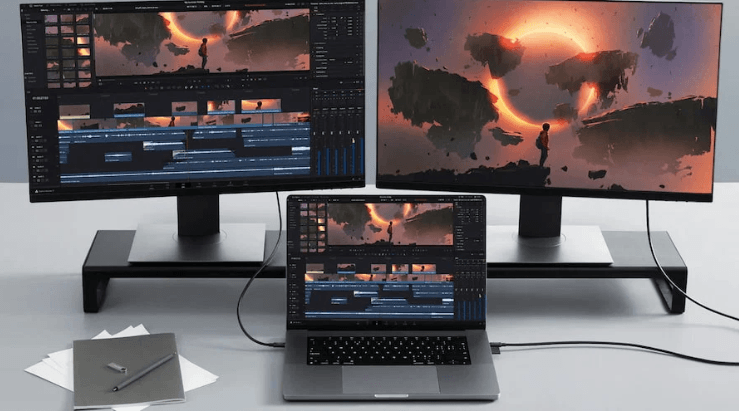
A high-quality USB-C 4K 60Hz cable can transmit ultra-high-definition video, digital audio, and power through a single connection, making it an ideal choice for modern laptops, monitors, gaming setups, and professional workstations.
This guide explains how USB-C handles 4K 60Hz video transmission, what specifications you should check before purchasing, and how to select the right USB-C video cable for your application.
What Does 4K 60Hz Mean?
Before understanding whether USB-C supports 4K 60Hz, it is important to understand what these terms mean.
4K resolution refers to a display format with approximately 4,000 horizontal pixels. The most common consumer 4K standard is:
3840 × 2160 pixels
Compared with Full HD (1920 × 1080), 4K provides four times more pixels, delivering sharper details, clearer images, and better viewing quality.
The term 60Hz refers to the refresh rate of a display. A 60Hz monitor refreshes the image 60 times per second.
A 4K 60Hz connection means the cable and devices can transmit:
3840 × 2160 resolution
60 frames per second
High-quality digital audio
Stable video signals without flickering or frame drops
For everyday users, this provides smoother video playback. For professionals and gamers, it improves productivity and visual performance.
Can USB-C Support 4K 60Hz Video Output?
Yes, USB-C can support 4K 60Hz video transmission, but only when the USB-C port and cable support the required technology.
USB-C itself is only a connector design. The actual capability depends on the protocol behind it.
A USB-C port may support:
USB 2.0 data only
USB 3.2 high-speed data
USB4
Thunderbolt 3
Thunderbolt 4
DisplayPort Alternate Mode
Among these technologies, DisplayPort Alt Mode is the key feature that allows USB-C to transmit video signals.
When a laptop, monitor, and USB-C cable support DisplayPort Alt Mode, the USB-C connection can carry:
4K 60Hz video
Audio transmission
Data communication
Power delivery
This is why many modern devices such as MacBook Pro, Dell XPS, Lenovo ThinkPad, and gaming laptops use USB-C as a complete connection solution.
Understanding USB-C Cable Specifications for 4K 60Hz
Many users assume that all USB-C cables are identical because they use the same connector. In reality, USB-C cables have significant differences in bandwidth, power capability, and video support.
USB-C Cable with DisplayPort Alt Mode
The most important requirement for USB-C 4K 60Hz video output is DisplayPort Alternate Mode support.
A standard charging USB-C cable may provide power but cannot transmit video.
For example:
A USB-C charging cable:
Supports charging
May support basic data transfer
Does not necessarily support video output
A USB-C video cable:
Supports DisplayPort Alt Mode
Handles higher bandwidth
Supports external monitors and displays
When selecting a USB-C cable for a monitor, always check whether the product specification clearly mentions:
DisplayPort Alt Mode
4K 60Hz support
Video transmission capability
USB-C Bandwidth and 4K 60Hz Performance
Bandwidth determines how much data a cable can carry.
Different USB-C standards provide different performance levels.
USB-C 2.0
USB-C 2.0 supports:
Data transfer up to 480Mbps
Basic charging functions
Although it uses the USB-C connector, it generally does not provide enough bandwidth for 4K 60Hz video transmission.
USB 3.2 Gen 1
USB 3.2 Gen 1 supports:
Up to 5Gbps data transfer
Some video applications depending on device support
USB 3.2 Gen 2
USB 3.2 Gen 2 supports:
Up to 10Gbps data transfer
Better compatibility with high-performance devices
USB4 and Thunderbolt
USB4 and Thunderbolt technologies provide significantly higher bandwidth.
They can support:
40Gbps data transfer
Multiple display connections
High-resolution video output
Professional workstation applications
For users connecting MacBooks, external GPUs, gaming monitors, or multiple displays, USB4 and Thunderbolt cables provide better future compatibility.
How to Check If Your Device Supports USB-C 4K 60Hz
Before purchasing a USB-C cable, check the specifications of both devices.
1. Check Your Laptop or Smartphone USB-C Port
Not every USB-C port supports video output.
Look for terms such as:
DisplayPort Alt Mode
Thunderbolt
USB4
Video output support
Common devices supporting USB-C video output include:
MacBook Air and MacBook Pro
Microsoft Surface devices
Dell XPS series
Lenovo ThinkPad models
HP business laptops
Some smartphones also support USB-C video output, but compatibility varies by manufacturer.
2. Check Your Monitor Input
Your monitor must also support compatible video input.
Common connections include:
USB-C input
HDMI 2.0/2.1
DisplayPort 1.2 or higher
For a direct USB-C connection, the monitor should support USB-C DisplayPort Alt Mode.
3. Choose the Correct USB-C Cable
The cable is often the weakest link.
A low-quality USB-C cable may cause:
Black screen
Limited refresh rate
Flickering images
Connection interruptions
For stable 4K 60Hz transmission, choose a cable with:
Certified high-speed construction
Proper shielding design
High-quality copper conductors
Reliable connector materials
Choosing the correct USB-C cable for 4K 60Hz monitor connection requires more than simply checking whether both ends use a USB-C connector.
A reliable connection depends on several technical factors, including bandwidth capability, signal stability, cable construction, and device compatibility.
1. Check USB-C Video Support
The first step is confirming that the cable supports video transmission.
Many USB-C cables available on the market are designed only for charging. These cables may work perfectly for powering smartphones or laptops but cannot transmit display signals.
For external monitor applications, look for specifications such as:
USB-C DisplayPort Alt Mode support
4K@60Hz video output
Thunderbolt compatibility
High bandwidth transmission
For professionals using MacBook external monitors, office docking stations, or creative workstations, selecting a dedicated USB-C video cable avoids compatibility issues.
2. Consider Cable Length
Cable length directly affects signal stability.
A shorter USB-C cable generally provides better signal efficiency because electrical resistance increases as cable length increases.
Common USB-C cable lengths include:
3ft USB-C Cable
Suitable for:
Desktop charging stations
Laptop docking setups
Close-distance monitor connections
Advantages:
Lower signal loss
Cleaner desk organization
Better portability
6ft USB-C Cable
Suitable for:
Office workstations
Gaming setups
Large desk configurations
Advantages:
More flexible installation
Easier device positioning
10ft USB-C Cable
Suitable for:
Conference rooms
Large workspaces
Professional AV environments
However, longer cables require better shielding and conductor quality to maintain stable 4K 60Hz transmission.
USB-C to HDMI Cable for 4K 60Hz: What You Need to Know
Many users connect USB-C laptops to HDMI monitors or TVs.
A USB-C to HDMI 4K 60Hz cable converts the DisplayPort signal from the USB-C port into HDMI output.
However, not every USB-C to HDMI cable supports 4K 60Hz.
When choosing a USB-C to HDMI cable, check:
HDMI 2.0 or HDMI 2.1 compatibility
4K 60Hz support
HDR compatibility if required
Stable shielding design
A cable that only supports HDMI 1.4 may be limited to:
4K 30Hz
which results in less smooth movement, especially for gaming and video editing.
USB-C 4K 60Hz Applications
USB-C 4K 60Hz connectivity is widely used across multiple industries.
Office and Business Workstations
Modern professionals often use laptops connected to:
External monitors
Docking stations
Conference displays
A single USB-C cable can replace multiple traditional connections by combining:
Video output
Data transfer
Charging
This simplifies desk setups and improves productivity.
Gaming Setup
Gamers require stable refresh rates and low latency.
A high-quality USB-C cable for gaming monitor can support:
4K gaming displays
High-resolution graphics
External monitors
Gaming laptops
However, gamers should confirm that both GPU output and monitor input support the required specifications.

Creative Professionals
Video editors, designers, and photographers often work with high-resolution displays.
A stable USB-C 4K 60Hz connection helps support:
Color-accurate monitors
Large project files
Professional editing workflows
For these users, cable reliability is especially important because unstable connections can interrupt creative processes.
Material Engineering Behind a Reliable USB-C Video Cable
From an engineering perspective, a high-performance USB-C cable is more than a simple connection wire.
Several design factors determine its performance.
High-Purity Copper Conductors
Quality USB-C cables use optimized copper conductors to reduce resistance and maintain efficient signal transmission.
Better conductivity helps improve:
Charging efficiency
Data integrity
Video stability
Shielding Structure
High-frequency signals used for video transmission are sensitive to electromagnetic interference.
Professional USB-C cables often include:
Aluminum foil shielding
Braided shielding layers
Ground protection
These designs help reduce:
Signal interruption
Screen flickering
Data transmission errors
Connector Quality
The connector is one of the most stressed parts of a cable.
A durable USB-C connector should provide:
Strong mechanical structure
Reliable contact pins
Corrosion resistance
Long insertion life
For daily users, connector durability directly affects the cable lifespan.
Engineering Case Study: USB-C Cable Solution for Multi-Monitor Office Deployment
A European technology company planned to upgrade its employee workstations with USB-C laptops and dual 4K monitors.
The purchasing team needed a cable solution that could provide:
Stable 4K 60Hz video transmission
Laptop charging support
Long-term daily usage durability
Multiple cable length options
During product evaluation, standard USB-C charging cables failed because they only supported power delivery without video transmission.
OSKO engineers analyzed the application requirements and developed a USB-C cable solution featuring:
High-quality copper conductors
Improved shielding structure
Reinforced connector design
Multiple length options including 3ft and 6ft versions
After testing, the cables successfully supported daily office monitor connections while maintaining stable video performance.
From a procurement perspective, choosing the correct USB-C cable specification helped the company reduce connection failures and simplify inventory management.
This type of OEM/ODM cable customization is one of OSKO’s manufacturing strengths, allowing businesses to develop USB-C cable solutions based on specific application requirements.
Selection Guide: How to Choose the Best USB-C Cable for 4K 60Hz
Before purchasing a USB-C cable, consider the following checklist:
For Home Users
Recommended:
USB-C 4K 60Hz cable
3ft or 6ft length
Basic DisplayPort Alt Mode support
Suitable for:
MacBook external monitor
Home office setup
Streaming devices
For Gamers
Recommended:
USB4 or Thunderbolt-compatible cable
Higher bandwidth support
Strong shielding design
Suitable for:
Gaming laptops
High-resolution monitors
Professional gaming setups
For Business Users
Recommended:
Durable braided USB-C cable
Multiple length options
Stable long-term performance
Suitable for:
Meeting rooms
Laptop docking stations
Enterprise deployment
FAQ About USB-C Support 4K 60Hz
Can USB-C support 4K 60Hz video output?
Yes, USB-C can support 4K 60Hz video output when the USB-C port, cable, and display device support the required specifications. The key technology is DisplayPort Alternate Mode, which allows USB-C connections to transmit video signals.
Do all USB-C cables support 4K 60Hz?
No. Many USB-C cables are designed only for charging or basic data transfer. A cable must support video transmission technologies such as DisplayPort Alt Mode, USB4, or Thunderbolt to achieve 4K 60Hz output.
What USB-C cable is best for a 4K monitor?
The best USB-C cable for a 4K monitor should support DisplayPort Alt Mode, 4K 60Hz transmission, reliable shielding, and sufficient bandwidth. For professional setups, USB4 or Thunderbolt-certified cables provide better future compatibility.
Can USB-C to HDMI support 4K 60Hz?
Yes, USB-C to HDMI can support 4K 60Hz when the cable supports HDMI 2.0 or higher and the connected devices are compatible. Some older USB-C to HDMI adapters only support 4K 30Hz.
Does USB-C 3.1 support 4K 60Hz?
USB-C 3.1 can support 4K 60Hz when the port supports DisplayPort Alt Mode. The USB data standard alone does not determine video capability because video transmission depends on alternate mode support.
Why does my USB-C cable only charge but not display video?
This usually happens because the cable is a charging-only cable, or the USB-C port does not support video output. Check whether both the cable and device support DisplayPort Alt Mode.
Is Thunderbolt better than USB-C for 4K displays?
Thunderbolt provides higher bandwidth and better performance for demanding applications, but a properly designed USB-C DisplayPort Alt Mode cable is sufficient for many 4K 60Hz monitor setups.
How long can a USB-C cable be for 4K 60Hz?
Cable length depends on construction quality and signal requirements. Shorter cables generally provide more reliable performance, while longer cables require better shielding and engineering design to maintain stable 4K 60Hz transmission.
Summary
So, can USB-C support 4K 60Hz video transmission?
The answer is yes, but choosing the right cable is essential.
USB-C has become one of the most versatile connectivity standards because it can combine video, data, and power through a single connection. However, not every USB-C cable provides the same performance.
For reliable USB-C 4K 60Hz video output, users should consider:
DisplayPort Alt Mode support
Cable bandwidth
Device compatibility
Cable length
Build quality
Whether you are connecting a MacBook to an external monitor, building a gaming setup, or deploying professional workstations, a properly engineered USB-C cable ensures stable performance and a better user experience.
As a professional USB cable manufacturer, OSKO provides OEM and ODM USB-C cable solutions designed for different markets, including retail, commercial applications, and customized projects.
Contact Information
OSKO – Professional USB Cable Manufacturer & OEM/ODM Supplier
Products:
USB-C to HDMI Cable
USB-C Fast Charging Cable
USB-C Data Cable
For wholesale pricing, OEM customization, and product samples, contact OSKO for professional cable solutions.
