















Introduction: What Does USB-C Look Like?
Have you ever tried connecting a charging cable and had to flip it several times before finding the correct direction? This common frustration was one of the biggest problems that USB-C was designed to solve.
So, what does USB C look like?
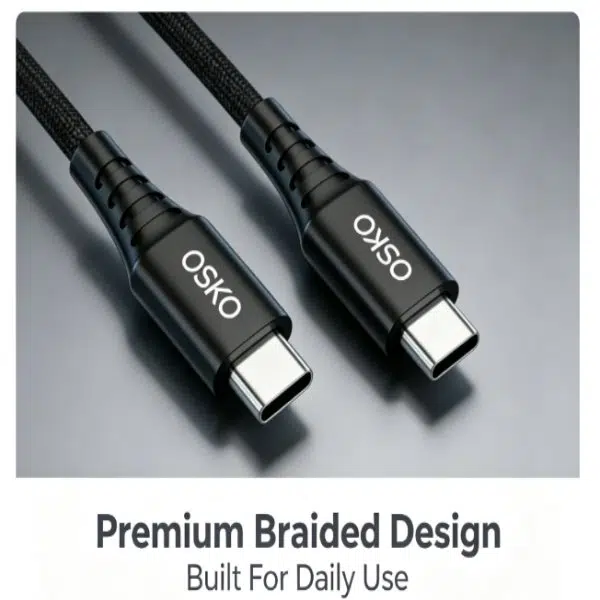
A USB-C connector is a small, oval-shaped port with a symmetrical design. Unlike traditional USB-A connectors that only work in one direction, USB-C is reversible, allowing users to plug the cable in either way without checking the orientation.
Today, USB-C has become the preferred connection standard for smartphones, tablets, laptops, gaming devices, monitors, and professional electronics because it combines:
Faster charging capability
Higher data transfer speeds
Compact design
Universal compatibility
From Apple’s latest iPhone models to Android smartphones and modern laptops, USB-C is quickly replacing older connectors such as Micro USB and USB-A.
This article explains what a USB-C port looks like, how to identify USB Type-C cables, the difference between USB-C and other connectors, and how to choose the right USB-C cable for your devices.

What Is USB-C?
USB-C, also known as USB Type-C, is a modern USB connector standard developed by the USB Implementers Forum (USB-IF).
Unlike previous USB versions, USB-C was designed as a universal connector that can handle multiple functions through a single port, including:
Charging power delivery
Data transfer
Video output
Audio transmission
External device connections
The most recognizable feature of USB-C is its reversible design.
Whether you insert the cable upside down or right side up, it connects successfully.
This simple improvement has made USB-C one of the most user-friendly connector designs available today.
Compared with older connectors:
USB-A uses a large rectangular shape
Micro USB uses a smaller but directional connector
Lightning uses Apple’s proprietary reversible connector
USB-C combines compact size with advanced performance
For consumers and businesses, USB-C represents the transition toward a more universal charging ecosystem.
What Does a USB-C Connector Look Like?
The easiest way to identify USB-C is by looking at its physical shape.
A USB-C connector has several unique characteristics.
1. Oval and Symmetrical Shape
The most obvious feature of USB-C is its oval-shaped design.
Unlike USB-A, which has a rectangular body with one correct insertion direction, USB-C is symmetrical on both sides.
This means:
No need to check the cable direction
Easier connection in dark environments
Less stress on ports during daily use
The compact design also allows manufacturers to create thinner smartphones and laptops.
2. Smaller Than USB-A
A USB-C connector is significantly smaller than traditional USB-A.
The compact size makes it ideal for:
Smartphones
Tablets
Ultrabooks
Portable monitors
Gaming devices
Modern electronic products increasingly require smaller connectors while maintaining high performance, which is why USB-C has become the preferred solution.
3. 24-Pin Connector Structure
Inside a USB-C connector are 24 pins designed for different functions.
These pins allow USB-C cables to support:
Power transmission
Data communication
Reverse charging
Display output
Alternate modes
The advanced pin structure is one reason USB-C can support much higher performance compared with older USB connectors.
How to Identify a USB-C Cable?
Many users confuse USB-C cables with Micro USB or other connectors.
Here are the easiest ways to identify a genuine USB-C cable.
Check the Connector Shape
A USB-C connector should have:
Rounded oval edges
Symmetrical appearance
No top or bottom direction
Similar shape on both sides
If the connector looks flat and rectangular, it is probably USB-A.
If it has a smaller angled shape, it is likely Micro USB.
Check the Cable Specification
Not all USB-C cables provide the same performance.
A USB-C cable can support different levels of:
Charging power
Data speed
Video capability
For example:
Standard USB-C Cable
Usually supports:
Charging
Basic data transfer
Smartphone accessories
Fast Charging USB-C Cable
Designed for:
USB Power Delivery (USB PD)
Higher wattage charging
Smartphones and laptops
High-Speed USB-C Cable
Supports:
USB 3.2
USB4
Thunderbolt compatibility
Before purchasing, always check the technical specifications instead of only looking at the connector type.
USB-C vs USB-A vs Micro USB vs Lightning
Understanding the differences between connectors helps users choose the correct charging cable.
| Feature | USB-C | USB-A | Micro USB | Lightning |
|---|---|---|---|---|
| Shape | Oval symmetrical | Rectangular | Small trapezoid | Slim reversible |
| Reversible | Yes | No | No | Yes |
| Data Speed | Up to 40Gbps (USB4) | Up to 10Gbps | Up to 480Mbps | Up to 480Mbps |
| Charging Capability | Up to 240W with USB PD | Limited | Limited | Limited |
| Main Usage | Modern devices | Older computers/accessories | Older Android devices | Older Apple devices |
USB-C provides the best combination of:
Speed
Power
Compatibility
Future usability
This is why many manufacturers are moving away from older connectors.

Common USB-C Devices and Accessories
USB-C has quickly become the standard connection interface for modern electronic devices. Its combination of compact design, high power delivery, and fast data transfer makes it suitable for a wide range of applications.
From smartphones and laptops to professional workstations, USB-C is changing how users connect, charge, and transfer information between devices.
1. Smartphones and Mobile Devices
Most modern Android smartphones use USB-C as the primary charging and data connection port.
Compared with older Micro USB connectors, USB-C provides several advantages:
Faster charging through USB Power Delivery (USB PD)
More reliable connection
Higher durability
Faster data synchronization
The adoption of USB-C has also expanded to Apple’s ecosystem. Starting from the iPhone 15 series, Apple introduced USB-C ports to replace the previous Lightning connector.
For smartphone users, choosing a high-quality USB-C charging cable is important because charging performance depends not only on the connector but also on the cable construction and supported power rating.
A 60W USB-C cable, for example, can support fast charging for many smartphones, tablets, and portable devices when paired with a compatible charger.
2. Laptops and Tablets
USB-C has become an essential feature in modern laptops and tablets.
Many devices now use USB-C ports for multiple functions:
Charging
External monitor connection
Data transfer
Docking station connection
Some laptops support USB-C Power Delivery, allowing users to charge their computers with a single USB-C cable instead of carrying a traditional power adapter.
For professionals who work remotely, a reliable USB-C cable simplifies their setup by replacing multiple cables with one universal connection.
Examples include:
MacBook series
Windows ultrabooks
Chromebooks
iPad Pro
Samsung Galaxy Tab series
3. USB-C Chargers and Power Accessories
USB-C chargers have become increasingly popular because they support advanced charging technologies such as:
USB Power Delivery (PD)
Programmable Power Supply (PPS)
GaN fast charging technology
A USB-C GaN charger can deliver higher power output while maintaining a smaller and lighter design.
For travelers and business users, a single USB-C charger can often power:
Smartphone
Tablet
Laptop
Wireless accessories
This reduces the number of chargers needed and creates a cleaner digital workspace.
However, the charger alone does not determine charging speed.
The complete charging system includes:
Charger + USB-C Cable + Device Compatibility
All three components must support the required power level.

4. USB-C Cables and Adapters
A USB-C cable is the key connection component that determines charging performance and data capability.
Different USB-C cables support different specifications.
Common categories include:
Standard USB-C Charging Cable
Suitable for:
Smartphones
Earbuds
Small accessories
Typical features:
Basic charging
USB 2.0 data transfer
Affordable price
Fast Charging USB-C Cable
Designed for higher power applications.
Features may include:
USB PD support
Higher current capacity
Better internal conductors
Heat-resistant materials
These cables are commonly used for:
iPhone fast charging
Android fast charging
Tablets
Portable monitors
High Power USB-C Cable
For laptops and professional equipment, higher wattage cables are required.
USB-C Power Delivery technology can support up to 240W with compatible cables.
These cables often include:
E-marker chips
Enhanced shielding
Thicker copper conductors
The E-marker chip allows devices and chargers to communicate and safely negotiate power levels.
Engineering Case Study: Selecting the Right USB-C Cable for a Commercial Charging Project
A European electronics distributor planned to introduce a new charging accessory line for office users and requested an OEM USB-C cable solution.
Their requirements included:
Compatibility with laptops and smartphones
Stable fast charging performance
Premium appearance for retail customers
Long service life for daily office environments
During product evaluation, the engineering team focused on several factors:
1. Cable Structure
A standard PVC cable was not suitable because frequent bending caused stress near the connector.
The solution was a braided nylon USB-C cable design with reinforced strain relief.
This improved:
Flexibility
Abrasion resistance
Durability
2. Power Performance
The customer required a cable capable of supporting laptop charging.
The final design used:
High-quality copper conductors
Optimized wire gauge
USB PD compatibility
The cable successfully supported stable 60W charging performance for mainstream laptops and tablets.
3. Manufacturing Quality Control
For OEM projects, appearance alone is not enough.
Production testing included:
Charging stability tests
Connector insertion tests
Bend cycle testing
Data transmission verification
A professional USB-C cable manufacturer should evaluate the complete electrical structure instead of only focusing on external appearance.
OSKO provides customized USB-C cable solutions including:
Custom lengths
Custom logo printing
OEM packaging solutions
How to Choose the Right USB-C Cable?
Choosing the correct USB-C cable depends on your application.
Before purchasing, consider the following factors.
1. Check Charging Power Requirements
Different devices require different charging power.
Examples:
Smartphones: 18W–45W
Tablets: 30W–60W
Laptops: 60W–140W+
High-performance devices: up to 240W
A cable that cannot support the required wattage will limit charging speed.
2. Consider Cable Length
Cable length affects convenience and performance.
Short cables:
Less resistance
Better for power banks
Suitable for desks
Long cables:
More flexible
Better for bedrooms, offices, and vehicles
Common USB-C cable lengths include:
3ft (0.9m)
6ft (1.8m)
10ft (3m)
For desktop setups, a 3ft or 6ft USB-C cable is often the most practical choice.
3. Choose Durable Materials
Cable durability depends on:
Outer jacket material
Connector reinforcement
Internal conductor quality
Common materials include:
PVC Cable
Advantages:
Lower cost
Lightweight
Suitable for basic charging.
Nylon Braided Cable
Advantages:
Better wear resistance
Premium appearance
More flexible
Longer lifespan
For daily users and commercial applications, braided USB-C cables usually provide better durability.
4. Verify Data Transfer Requirements
Not every USB-C cable supports high-speed data.
Depending on the cable specification:
USB-C cables may support:
USB 2.0: 480 Mbps
USB 3.2: up to 20Gbps
USB4: up to 40Gbps
If you transfer large files or connect external displays, choose a cable designed for high-speed transmission.
Why USB-C Has Become the Future Standard
The rapid adoption of USB-C is not accidental.
It solves many problems that existed with previous connectors.
The main advantages include:
Universal Compatibility
One connector can support:
Mobile devices
Computers
Displays
Accessories
Higher Charging Capability
USB-C Power Delivery enables faster and safer charging for small and large devices.
Better User Experience
The reversible design eliminates incorrect insertion problems.
Reduced Electronic Waste
A universal charging standard reduces the need for multiple cable types.
Conclusion: What Does USB-C Look Like and Why Does It Matter?
So, what does USB C look like?
A USB-C connector is a small, oval-shaped, reversible connector designed for modern digital devices. Its compact size, powerful charging capability, and high-speed data performance make it one of the most important connection standards today.
Compared with USB-A, Micro USB, and Lightning, USB-C offers better flexibility and future compatibility.
However, users should remember that not all USB-C cables are identical.
The connector shape may look the same, but charging power, data speed, material quality, and durability can vary significantly.
For consumers, choosing a reliable USB-C cable ensures safer charging and better device performance.
For businesses and distributors, working with an experienced USB-C cable manufacturer helps create products that meet market expectations in regions such as the United States, Germany, Australia, and the Netherlands.
OSKO specializes in OEM and ODM USB cable solutions, providing durable charging cables designed for retail, wholesale, and professional applications.
FAQ About What Does USB-C Look Like
What does a USB-C port look like?
A USB-C port looks like a small oval-shaped opening with a symmetrical design. Unlike USB-A ports, it does not have a specific top or bottom direction, allowing the cable to be inserted either way.
How can I tell if my cable is USB-C?
You can identify a USB-C cable by checking the connector shape. A USB-C connector is oval, compact, and reversible. If the connector is rectangular, it is usually USB-A, while a smaller angled connector is typically Micro USB.
Is USB-C the same as Type-C?
Yes. USB-C and USB Type-C refer to the same connector standard. The terms are commonly used interchangeably.
Are all USB-C cables the same?
No. USB-C cables may look identical but can have different charging power, data transfer speeds, and features. Some support only basic charging, while others support fast charging, video output, USB4, or Thunderbolt technology.
Can USB-C charge laptops?
Yes. Many laptops support USB-C charging through USB Power Delivery. Depending on the device and cable specification, USB-C can deliver power from basic smartphone charging levels up to 240W.
What is the difference between USB-C and USB-A?
USB-C is smaller, reversible, and supports higher power and faster data transfer. USB-A is the traditional rectangular connector commonly found on older computers and chargers.
What USB-C cable is best for fast charging?
The best USB-C cable for fast charging should support USB Power Delivery, have appropriate wattage certification, quality internal conductors, and compatibility with your charger and device.
Can USB-C transmit video?
Yes. Certain USB-C ports and cables support DisplayPort Alt Mode or Thunderbolt, allowing video transmission to monitors, TVs, and docking stations.
Contact OSKO
OSKO provides professional OEM USB cable and ODM charging cable solutions for global distributors, retailers, and electronics brands.
Products include:
USB-C to USB-C cables
USB-C fast charging cables
Braided nylon USB cables
Custom logo USB cables
Wholesale charging cable solutions
For custom cable projects, contact OSKO for specifications, samples, and production support.
