















Introduction
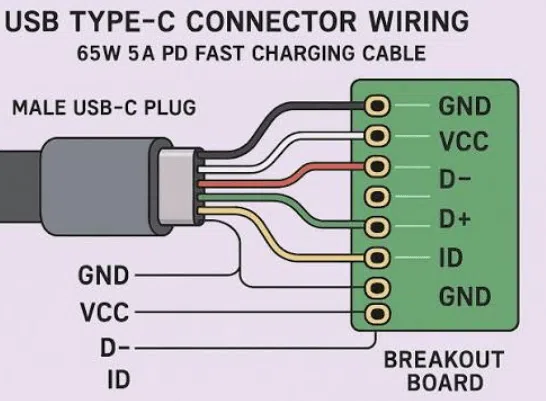
When users search for a USB-C cable wiring diagram, they are usually trying to understand why different USB-C cables have different charging speeds, data performance, and compatibility.
Although USB-C connectors look identical externally, the internal wiring design can be completely different.
A USB-C cable may support:
Basic charging only
USB 2.0 data transfer
USB 3.x high-speed data
USB4 data transmission
60W, 100W, or 240W Power Delivery charging
The difference comes from the internal cable architecture, including:
Power conductors
Ground lines
Data pairs
Configuration channels
Shielding structure
E-marker communication
Understanding the USB-C cable wiring diagram is important for:
Engineers designing products
Brands sourcing USB-C cables
Distributors selecting specifications
Users choosing the correct cable
This guide explains USB-C pin functions, cable structures, charging technology, and OEM manufacturing requirements.
Material Science & Dielectric Properties
Understanding USB-C Connector Pin Structure
A USB-C connector contains 24 pins arranged in a reversible design.
The reversible feature means users can insert the connector in either direction while maintaining electrical communication.
A simplified USB-C pin arrangement:
        USB-C Connector

      A Side        B Side

   A1  GND        GND  B12
   A2  TX1+       RX2+ B11
   A3  TX1-       RX2- B10
   A4  VBUS       VBUS B9
   A5  CC         SBU2 B8
   A6  D+         D-   B7
   A7  D-         D+   B6
   A8  SBU1       CC   B5
   A9  VBUS       VBUS B4
   A10 RX2-       TX1- B3
   A11 RX2+       TX1+ B2
   A12 GND        GND B1
(Note: Actual USB-C electrical behavior depends on cable type and connected devices.)
Main USB-C Cable Wiring Functions
VBUS Power Line
VBUS is responsible for power delivery.
Function:
Transfers charging voltage
Supplies power to connected devices
Typical USB-C power levels:
| Standard | Maximum Power |
|---|---|
| USB-C Basic | 15W |
| USB PD | 100W |
| USB PD 3.1 EPR | 240W |
Higher-power cables require stronger VBUS conductors.
GND Ground Line
Ground provides the return path for electrical current.
A quality cable requires:
Low resistance grounding
Stable electrical connection
Proper shielding integration
Poor grounding can cause:
Charging instability
Signal interference
Increased heat
CC (Configuration Channel) Pin
The CC pin is one of the most important USB-C communication channels.
It controls:
Cable orientation detection
Power negotiation
Device identification
USB Power Delivery communication happens through the CC line.
For example:
A charger uses CC communication to determine:
Is this a 3A cable?
Is this a 5A cable?
Can higher power be delivered?
D+ and D- Data Lines
D+ and D- are used for USB 2.0 communication.
Applications:
Phone data transfer
CarPlay communication
Basic USB devices
A USB-C cable with only:
VBUS
GND
CC
D+
D-
may support charging and basic data but not high-speed transfer.
SuperSpeed Data Lines
Higher-speed USB-C cables include additional differential pairs.
Used for:
USB 3.2
USB4
External SSDs
High-resolution displays
These require:
Better shielding
Precise impedance control
Higher-quality materials
USB-C Cable Types Based on Internal Wiring
Not every USB-C cable contains all 24 functional connections.
USB-C Charging Cable
Basic structure:
VBUS
GND
CC
Applications:
Charging only
Power banks
Simple devices
USB-C USB 2.0 Cable
Includes:
Power lines
CC communication
D+ / D- data lines
Applications:
Phone charging
Basic data transfer
CarPlay

USB-C USB 3.x Cable
Includes:
Additional SuperSpeed pairs
Advanced shielding
Applications:
External storage
Cameras
Professional devices
USB4 Cable
Highest-performance USB-C cables include:
High-frequency signal pairs
Advanced shielding
Strict manufacturing control
Applications:
Thunderbolt devices
Professional displays
High-speed storage
USB-C Cable Wiring and Power Rating
The wiring structure directly affects charging capability.
| Cable Rating | Internal Requirement |
|---|---|
| 60W USB-C Cable | 3A current support |
| 100W USB-C Cable | 5A + E-marker |
| 240W USB-C Cable | PD 3.1 EPR + E-marker |
Why E-Marker Chip Is Important
High-power USB-C cables require an electronic identification chip.
The E-marker communicates:
Cable current capability
Power rating
Safety information
Example:
A 100W USB-C cable tells the charger:
“Allow up to 5A current.”
Without this information:
Charger limits output
Fast charging may fail
Cable Material and Signal Integrity
A USB-C cable is not only about wiring.
Material selection affects performance.
Important components:
| Material | Purpose |
|---|---|
| Copper conductor | Power transfer |
| Shielding foil | EMI protection |
| Braided layer | Mechanical protection |
| Insulation | Electrical safety |
| Outer jacket | Durability |
Premium products often use:
Heavy duty braided USB-C cable manufacturer
solutions for:
Retail cables
Automotive cables
Professional charging cables
Case Study
European Electronics Brand Develops Custom USB-C Cable Series
Customer Background
A European accessory company wanted to develop multiple USB-C cable models for:
Smartphone charging
Laptop charging
Data transfer
Retail packaging
Product requirements:
60W charging cable
100W laptop cable
Custom lengths
Nylon braided design
Customer Challenges
Different Internal Specifications
The customer previously used one cable design for all applications.
Problems:
Slow laptop charging
Limited data performance
Customer confusion
Need for Product Differentiation
The company needed:
Clear specifications
Reliable performance
Custom branding

OSKO Solution
OSKO designed different cable structures:
| Product | Wiring Design |
|---|---|
| Phone cable | USB 2.0 + 60W |
| Laptop cable | E-marker + 100W |
| Premium cable | High-power design |
The solution supported:
OEM USB-C cable manufacturer
ODM USB cable production
USB-C cable wholesale
Bulk USB cables
Selection Guide
How to Choose the Correct USB-C Cable
For Phone Charging
Recommended:
USB-C charging cable
60W support
USB 2.0 data
For CarPlay
Recommended:
USB-C data cable
D+/D- support
Shielded structure
For Laptop Charging
Recommended:
100W or 240W cable
E-marker chip
Strong conductor design
For Professional Data Transfer
Recommended:
USB 3.x or USB4 cable
Advanced shielding
Certified performance
OEM Buyer Guide
For businesses sourcing USB-C cables, evaluate:
| Requirement | Importance |
|---|---|
| Wiring specification | Determines function |
| Power testing | Ensures safety |
| Signal testing | Ensures data performance |
| Material quality | Improves durability |
| Factory capability | Ensures consistency |
Professional suppliers provide:
USB-IF compliant Type C cable manufacturer
ISO9001 certified braided USB cable factory
OEM ODM custom length USB C cables
CE RoHS certified USB-C cable solutions
FAQ
Does every USB-C cable have the same wiring?
No. USB-C cables can have different internal structures depending on charging and data requirements.
How many wires are inside a USB-C cable?
The number varies. Basic cables may have only a few conductors, while high-performance USB4 cables contain many signal paths.
Can I use a USB-C charging cable for data transfer?
Not always. Some USB-C cables are designed only for charging.
Why do some USB-C cables charge slowly?
Common reasons:
Low power rating
Poor conductor quality
Missing E-marker chip
Incorrect charger compatibility
Does a 240W USB-C cable have different wiring?
Yes. It requires higher voltage support, E-marker communication, and stronger internal construction.
Summary
The USB-C cable wiring diagram explains why different USB-C cables provide different levels of charging speed and data performance.
The key differences come from:
Power conductors
Data lines
CC communication
E-marker chips
Shielding design
A simple charging cable may only support basic power, while advanced USB-C cables can deliver:
100W laptop charging
240W PD 3.1 power
High-speed USB4 data
For consumers, understanding USB-C wiring helps select the correct cable.
For brands, retailers, and distributors, working with an experienced USB-C cable manufacturer ensures correct engineering, reliable testing, and consistent OEM production.
Contact Information
OSKO provides professional USB-C cable manufacturing solutions:
USB-C charging cables
USB-C data cables
60W / 100W / 240W cables
USB4 cable solutions
OEM and ODM USB cables
Custom length cables
Private label USB-C products
