















Introduction
As mobile devices become more powerful, charging technology is evolving beyond simply receiving power. A new feature called reverse charging allows smartphones and portable devices to share battery power with other electronics, turning your phone into a small emergency power source.
Many users now search for questions like “What is reverse charging?”, “Can iPhone 15 charge another phone?”, and “What USB-C cable is needed for reverse charging?”. These questions have become especially popular after Apple introduced the USB-C port on the iPhone 15 series.
Unlike traditional charging, where a wall charger supplies energy to your device, reverse charging allows one device to act as the charger and transfer power to another device. This technology is useful when traveling, during outdoor activities, business trips, or emergency situations where a power outlet is unavailable.
In this guide, we will explain how USB-C reverse charging works, whether the iPhone 15 supports reverse charging, what type of cable you need, and how to choose a reliable USB-C charging cable for safe and efficient power transfer.
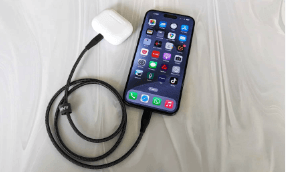
What Is Reverse Charging?
Reverse charging is a charging technology that allows one electronic device to provide power to another device. Instead of only receiving energy, the host device becomes a temporary power source.
For example:
A smartphone can charge wireless earbuds.
A tablet can provide power to a smartphone.
A laptop can charge accessories through a USB-C connection.
Reverse charging is commonly divided into two categories:
Wired Reverse Charging
Wired reverse charging uses a physical cable to transfer power between two devices.
The most common setup is a USB-C to USB-C cable connecting:
Smartphone → Earbuds
Smartphone → Another smartphone
Laptop → Portable accessories
The host device detects the connected device and automatically negotiates power delivery. The built-in power management system controls voltage and current output to protect both devices.
Compared with wireless solutions, wired reverse charging usually provides:
Higher charging efficiency
Faster power transfer
Less energy loss
Better stability
For users who need reliable power sharing, a high-quality USB-C to USB-C charging cable is the preferred solution.
Wireless Reverse Charging
Wireless reverse charging uses electromagnetic induction technology.
The host device creates a magnetic field through its wireless charging coil, transferring energy to another compatible device placed on top of it.
Common examples include:
Android flagship phones charging wireless earbuds
Smartphones charging smart watches
Advantages:
No cable required
Easy device placement
Convenient for accessories
However, wireless reverse charging is generally slower than wired reverse charging because energy conversion creates more power loss and heat.
How Does USB-C Reverse Charging Work?
USB-C reverse charging depends on three important technologies:
1. USB Power Delivery (USB PD)
USB Power Delivery is a fast charging standard that allows devices to communicate and negotiate the correct power level.
When two USB-C devices connect, they exchange information:
Which device provides power
Which device receives power
Required voltage and current level
This intelligent negotiation prevents excessive power output and improves charging safety.
2. USB-C Power Direction Switching
Traditional USB charging usually follows a fixed direction:
Charger → Device
USB-C introduces a more flexible power system:
Device A ↔ Device B
A USB-C device can automatically determine whether it should receive or supply power.
This is why modern USB-C devices can support:
Charging
Data transfer
Display output
Reverse power sharing
3. Quality USB-C Cable Construction
The cable plays an important role in reverse charging performance.
A poor-quality USB-C cable may cause:
Slow charging speed
Voltage drops
Unstable connection
Excess heat
A reliable USB-C cable should include:
High-quality copper conductors
Proper shielding
Reinforced connectors
E-marker chip for high-power charging cables
Durable outer jacket
For example, a 100W USB-C to USB-C cable with an E-marker chip can safely support higher power applications such as laptops, tablets, and advanced charging systems.
Does iPhone 15 Support Reverse Charging?
Yes, the iPhone 15 series supports wired reverse charging through its USB-C port.
This is one of the biggest changes compared with previous Lightning-based iPhones.
With USB-C connectivity, iPhone 15 users can provide power to compatible accessories, including:
AirPods with USB-C charging case
Apple Watch through compatible charging accessories
Other USB-C devices
The iPhone 15 can provide power output through its USB-C port, making emergency charging scenarios much easier.
For example:
Imagine you are traveling and your AirPods battery is empty before a flight. Instead of searching for a charger, you can connect your AirPods charging case to your iPhone 15 using a suitable USB-C cable.

How to Reverse Charge with iPhone 15
Using reverse charging on iPhone 15 is simple.
Step 1: Prepare Compatible Devices
Make sure:
Your iPhone 15 has enough battery capacity.
The receiving device supports USB-C charging.
Step 2: Use a USB-C Cable
Connect both devices using:
Examples:
iPhone 15 → Android phone
iPhone 15 → USB-C AirPods case
iPhone 15 → Portable accessory
A quality cable ensures stable power transfer.
Step 3: Automatic Power Sharing
After connection, the iPhone automatically detects the other device and begins supplying power.
No additional settings are required.
Step 4: Monitor Battery Usage
Because reverse charging uses your phone’s battery, remember:
Your iPhone battery will decrease faster.
Charging speed depends on the receiving device.
Cable quality affects efficiency.
For emergency situations, reverse charging is extremely useful. However, it is not designed to replace a dedicated power bank for daily use.
Choosing the Best USB-C Cable for Reverse Charging
Not all USB-C cables provide the same charging performance.
When selecting a USB-C cable for reverse charging, consider these factors:
Power Rating
Different USB-C cables support different power levels.
Common ratings include:
60W USB-C Cable
Suitable for:
Smartphones
Tablets
Accessories
Daily charging
100W USB-C Cable
Suitable for:
MacBook Pro
Gaming laptops
High-performance devices
240W USB-C Cable
Designed for:
Future high-power USB-C devices
Professional laptops
Advanced charging applications
Choosing the correct wattage ensures safe and efficient charging.
Cable Length
Cable length affects charging efficiency.
Short cables usually provide:
Lower resistance
Better charging efficiency
More stable power delivery
Long cables offer convenience but require better internal construction.
For travel and mobile use:
3ft USB-C cable: compact and efficient
6ft USB-C cable: flexible daily use
10ft USB-C cable: suitable for desks and long-distance charging
Cable Durability
For frequent charging and travel, durability matters.
A premium USB-C cable should include:
Braided nylon jacket
Reinforced stress points
Strong connector housing
Bend resistance testing
These features reduce cable failure caused by repeated bending.
Engineering Case Study: USB-C Cable Design for Power Sharing Applications
A European electronics accessory distributor wanted a reliable USB-C cable solution for customers using iPhone 15 and Android flagship devices.
The main requirements included:
Stable reverse charging performance
Compatibility with multiple USB-C devices
Long service life
Retail-ready quality
During product development, OSKO engineers focused on:
Optimizing copper conductor size
Improving connector durability
Adding shielding protection
Testing power stability under different charging conditions
The final USB-C to USB-C cable solution achieved:
Stable power delivery
Reliable device recognition
Improved bending resistance
Compatibility with smartphones, tablets, and accessories
For global markets including the US, Germany, Australia, and the Netherlands, durable USB-C charging cables have become an important product category as more devices transition from Lightning and Micro USB to USB-C.
Tips to Use Reverse Charging Safely
To protect your devices:
Use Certified Quality Cables
Avoid extremely cheap USB-C cables with unknown specifications.
Low-quality cables may cause:
Overheating
Slow charging
Connection problems
Avoid Excessive Reverse Charging
Reverse charging consumes your device battery.
Use it mainly for:
Emergency charging
Accessories
Short-term power sharing
Keep Devices Cool
Heat is one of the biggest factors affecting battery health.
Avoid reverse charging:
Under direct sunlight
Inside hot vehicles
During heavy gaming sessions
Conclusion
Reverse charging represents the next step in mobile connectivity, allowing devices to share power when traditional chargers are unavailable.
With the introduction of USB-C on iPhone 15, Apple users can now experience more flexible charging options through USB-C reverse charging.
However, the performance of reverse charging depends heavily on the cable quality. Choosing a durable USB-C to USB-C cable with proper power support ensures safer, faster, and more reliable energy transfer.
For consumers and businesses, USB-C technology provides a more universal charging ecosystem that connects smartphones, tablets, laptops, and accessories with fewer cables and greater convenience.
FAQ About Reverse Charging
Can iPhone 15 charge another phone?
Yes. iPhone 15 can provide limited power output through its USB-C port to charge compatible USB-C devices. A USB-C to USB-C cable is required.
Does iPhone 14 support reverse charging?
No. iPhone 14 does not support wired reverse charging because it uses a Lightning port. Apple introduced USB-C connectivity starting with iPhone 15.
What cable do I need for reverse charging?
A USB-C to USB-C cable is recommended for wired reverse charging. The cable should support power transfer and match the charging requirements of both devices.
Is reverse charging bad for battery health?
Occasional reverse charging does not significantly damage battery health. However, frequent high-power reverse charging may increase battery cycles and heat generation.
Can USB-C cables charge AirPods?
Yes. USB-C cables can charge AirPods models that use USB-C charging cases, such as newer AirPods versions.
Is a 100W USB-C cable faster than a 60W cable?
A 100W USB-C cable supports higher power delivery, but actual charging speed depends on the charger and device. A phone that supports only 30W charging will not charge faster with a 100W cable.
Are all USB-C cables suitable for reverse charging?
No. Some USB-C cables only support basic charging or data transfer. For reliable reverse charging, choose a cable with proper power delivery support and quality construction.
What is the best USB-C cable for iPhone 15?
The best USB-C cable for iPhone 15 should provide stable charging, durable construction, and compatibility with USB Power Delivery. A braided USB-C to USB-C cable is a popular choice for daily use.
About OSKO
OSKO specializes in designing and manufacturing USB charging cables, including:
Fast charging cables
OEM/ODM customized cables
With professional cable engineering, material control, and global supply capability, OSKO provides reliable charging solutions for brands, retailers, and distributors worldwide.
