















Introduction: Understanding Micro USB Cable Technology
Although USB-C has become the dominant connector for modern smartphones and laptops, Micro USB cables still play an important role in many electronic devices worldwide. From Bluetooth speakers and cameras to GPS devices, power banks, and industrial equipment, Micro USB remains widely used because of its affordable cost, compact size, and broad compatibility.
For users searching “what is a Micro USB cable”, the answer is simple: a Micro USB cable is a small USB connector designed for charging and data transfer between electronic devices. It became one of the most popular mobile charging standards before USB-C gradually replaced it.
Understanding Micro USB specifications, applications, and differences compared with newer USB connectors helps consumers, retailers, and procurement teams choose the right cable solution.
Whether you need a replacement Micro USB charging cable, a bulk order for electronics accessories, or an OEM cable supplier for customized products, selecting the correct cable specification directly affects performance, reliability, and user experience.
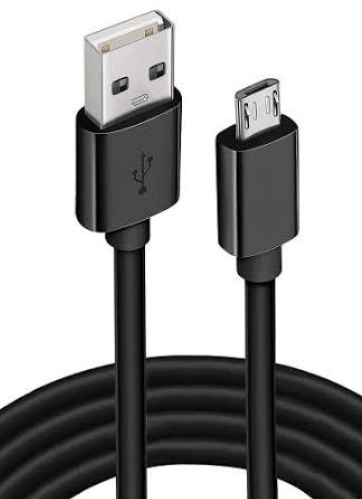
What Is a Micro USB Cable?
A Micro USB cable is a compact USB connector commonly used for charging and data synchronization in portable electronic devices.
The connector was designed as a smaller alternative to traditional USB Type-A and Mini USB connectors, allowing manufacturers to create thinner and more portable devices.
A typical Micro USB cable contains:
USB connector for power and data transmission
Copper conductors for electricity transfer
Data lines for device communication
Protective insulation layer
External jacket for durability
Micro USB cables are mainly divided into two types:
Micro USB Type-A
Micro USB Type-A is less common and mainly designed for host connections.
Typical applications include:
USB OTG devices
Certain cameras
Specialized electronics
Its rectangular design allows devices to communicate with USB peripherals.
Micro USB Type-B
Micro USB Type-B is the most widely used version.
It can be found in:
Android smartphones
Tablets
Digital cameras
Bluetooth speakers
E-readers
GPS devices
Power banks
Game controllers
The connector has a smaller tapered shape and supports both charging and data transfer functions.
Micro USB Cable Technical Specifications
A standard Micro USB data cable usually follows USB 2.0 specifications.
Common specifications include:
Data Transfer Speed
Most Micro USB cables support:
USB 2.0 data transfer
Speed up to 480 Mbps
This is sufficient for:
Smartphone synchronization
Photo transfer
Basic file management
Some advanced Micro USB 3.0 versions support:
Up to 5 Gbps data transfer speed
However, USB 3.0 Micro USB connectors are less common compared with standard Micro USB 2.0.
Charging Power Capability
Traditional Micro USB cables generally support:
5V charging
Up to approximately 2.5W standard USB power
Some enhanced Micro USB charging cables can support higher current charging depending on cable quality and device compatibility.
However, compared with USB-C Power Delivery technology, Micro USB has limitations in charging modern high-power devices such as laptops and tablets.
Micro USB vs Mini USB: What Is the Difference?
Both Micro USB and Mini USB were designed for smaller electronic devices, but they belong to different generations of USB technology.
Mini USB
Mini USB was widely used in early digital devices, including:
Digital cameras
MP3 players
External hard drives
Characteristics:
Larger connector size
Lower durability compared with Micro USB
Mostly replaced by newer connectors
Micro USB
Micro USB became popular because it offered:
Smaller physical size
Better durability
More compact device designs
Improved mobile compatibility
Compared with Mini USB, Micro USB was better suited for smartphones and portable electronics.
Today, Mini USB is rarely used, while Micro USB remains common in many affordable electronic products.
Micro USB vs USB-C: Which Cable Is Better?
The biggest comparison today is Micro USB vs USB-C.
USB-C represents the next generation of USB connectivity and provides several advantages.
Connector Design
Micro USB:
One-way insertion
Requires correct orientation
Smaller than Mini USB
USB-C:
Reversible connector
Can be inserted either direction
More convenient for daily use
Charging Performance
Micro USB:
Designed mainly for smartphones and small devices
Limited power capability
USB-C:
Supports USB Power Delivery (USB PD)
Can provide much higher power output
Suitable for phones, tablets, and laptops
For modern fast charging applications, USB-C is the preferred solution.
Data Transfer Speed
Micro USB:
Usually up to 480 Mbps
USB-C:
Supports USB 3.2
Supports USB4
Can reach significantly higher transfer speeds
For transferring large files, videos, or professional data, USB-C offers better performance.
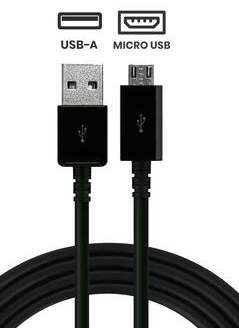
Common Uses of Micro USB Cables
Although newer devices have moved toward USB-C, Micro USB cables are still widely used in many applications.
1. Smartphone Charging
Older Android smartphones commonly use Micro USB charging cables.
Users can use them for:
Battery charging
Data synchronization
Software updates
2. Bluetooth Speakers and Headphones
Many affordable audio devices still use Micro USB because of its low production cost and reliability.
Examples include:
Portable speakers
Wireless headphones
Bluetooth receivers
3. Cameras and Digital Devices
Micro USB remains common in:
Digital cameras
Action cameras
Security cameras
Recording equipment
These devices often require stable charging and data transfer connections.
4. Power Banks and Accessories
Many power banks manufactured before the USB-C transition use Micro USB input ports.
Users often need Micro USB cables for:
Charging power banks
Connecting accessories
Device maintenance
How to Choose the Right Micro USB Cable?
Selecting the correct Micro USB charging cable requires considering several factors.
1. Check Device Compatibility
Before purchasing, confirm:
Connector type
Device charging requirements
Data transfer needs
Not all Micro USB cables provide the same performance.
2. Choose Data Transfer Capability
If you only need charging, a basic Micro USB cable may be enough.
For transferring files, choose a:
Micro USB data cable
USB 2.0 compatible cable
High-quality shielded cable
3. Consider Cable Length
Common Micro USB cable lengths include:
0.5m
1m
1.5m
2m
3m
Short cables provide better portability, while longer cables offer more flexibility for home and office use.
4. Focus on Durability
Cable durability depends on:
Outer jacket material
Connector reinforcement
Internal wire quality
A durable Micro USB cable often includes:
Nylon braided exterior
Reinforced connector housing
Flexible stress protection
These features reduce damage caused by bending and repeated use.
5. Check Certifications and Quality Standards
Professional cable suppliers typically follow quality standards including:
USB specification compliance
RoHS requirements
CE certification
FCC requirements
For businesses purchasing in bulk, working with an experienced OEM USB cable manufacturer helps ensure consistent quality.
Engineering Case Study: Developing Durable Micro USB Cables for Industrial Electronics
A European electronics distributor supplying GPS equipment required a customized Micro USB charging cable with improved durability for professional environments.
The main challenges included:
Frequent daily plugging and unplugging
Cable failures near connectors
Need for stable data communication
Long-term outdoor usage
OSKO engineering team optimized the cable structure through:
Reinforced Micro USB connector design
Improved copper conductor selection
Enhanced bending protection
Durable TPE and braided jacket options
The final customized cable solution improved:
Mechanical reliability
Product lifespan
Customer satisfaction
Brand reputation
This example demonstrates why selecting an experienced USB cable manufacturer is essential for businesses requiring reliable charging and data solutions.
Micro USB Cable Maintenance Tips
Proper maintenance can extend cable lifespan.
Follow these practices:
Avoid sharp bending near connectors
Disconnect by holding the connector instead of pulling the cable
Keep connectors clean and dry
Avoid excessive twisting
Store cables properly when not in use
Using cable organizers and protective accessories can also reduce unnecessary damage.
Why Businesses Choose OSKO Micro USB Cable Solutions
OSKO provides professional USB cable manufacturing services for global customers.
Product capabilities include:
Micro USB charging cables
USB-C cables
Lightning cables
Custom USB cable solutions
OSKO supports:
OEM customization
Logo printing
Custom packaging
Bulk production
Quality control management
For wholesalers, distributors, and electronics brands searching for a reliable OEM USB cable supplier, manufacturing capability and consistent quality are key factors.
Conclusion: Is Micro USB Still Worth Using?
Although USB-C has become the future standard for modern electronics, Micro USB cables remain valuable for many existing devices.
They continue to provide reliable charging and data transfer solutions for:
Cameras
Speakers
Power banks
Industrial equipment
Older smartphones
When choosing a Micro USB cable, users should consider compatibility, charging requirements, cable durability, and manufacturer quality.
For businesses, selecting a professional Micro USB cable manufacturer ensures stable supply, customized solutions, and long-term product reliability.
FAQ About Micro USB Cable
What is a Micro USB cable used for?
A Micro USB cable is mainly used for charging and transferring data between electronic devices such as smartphones, cameras, Bluetooth speakers, and power banks.
Is Micro USB the same as USB Type-C?
No. Micro USB and USB-C are different connector types. USB-C is newer, reversible, supports higher charging power, and provides faster data transfer speeds.
Does Micro USB support fast charging?
Some Micro USB cables support faster charging depending on the device and cable design, but they cannot match USB-C Power Delivery charging performance.
What devices still use Micro USB cables?
Many Bluetooth speakers, cameras, GPS devices, power banks, e-readers, and older Android smartphones still use Micro USB connectors.
Can a Micro USB cable transfer data?
Yes. Most Micro USB cables support both charging and data transfer. However, some low-quality cables are designed only for charging.
How fast is Micro USB data transfer?
Standard Micro USB 2.0 cables support data transfer speeds up to 480 Mbps. Some USB 3.0 Micro USB versions can reach up to 5 Gbps.
Why is my Micro USB cable not charging?
Common causes include damaged connectors, broken internal wires, dirty charging ports, incompatible chargers, or poor-quality cables.
Is USB-C better than Micro USB?
For modern devices, USB-C is generally better because it supports faster charging, higher power delivery, reversible connection, and faster data transfer.
Can businesses order customized Micro USB cables?
Yes. Professional USB cable manufacturers can provide OEM services including custom lengths, branding, packaging, and bulk production.
Contact OSKO
OSKO specializes in OEM and ODM USB cable manufacturing solutions for global customers.
Products:
Micro USB Cable | USB-C Cable | Lightning Cable | Custom Data Cable
Services:
OEM Manufacturing | Wholesale Supply | Custom Design | Bulk Production
Contact OSKO for professional charging cable solutions.
