















USB-A vs USB-C: Understanding the Difference Between Two USB Standards
USB cables have become an essential part of modern electronics. From smartphones and laptops to tablets, monitors, and industrial equipment, USB technology connects billions of devices worldwide.
However, as USB-C becomes increasingly common, many users and businesses still ask an important question:
What is the difference between USB-A and USB-C, and which USB cable should you choose?
Although USB-A and USB-C belong to the same Universal Serial Bus (USB) family, they are designed for different generations of technology.
USB-A represents the traditional USB connector that has powered computers and accessories for decades, while USB-C represents the next generation of connectivity with faster charging, higher data transfer speeds, and a reversible design.
Understanding the difference between USB-A vs USB-C is important when selecting charging cables, data cables, and OEM cable solutions for consumer electronics.
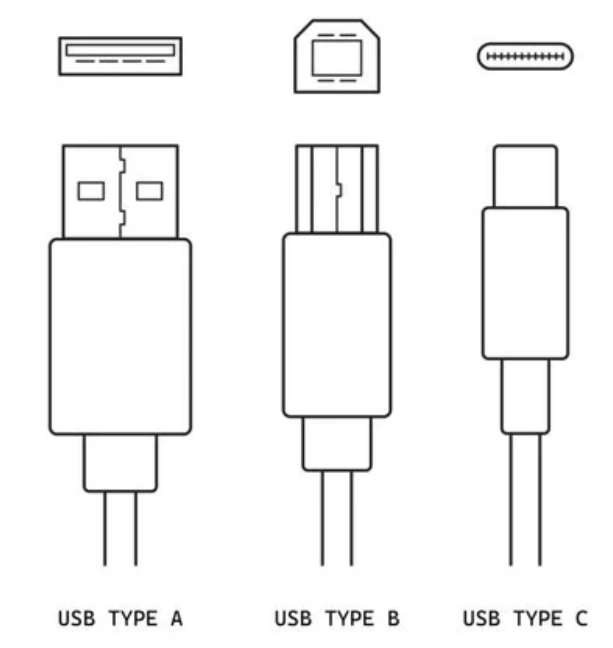
What Is USB-A?
USB-A is the original USB connector design that became widely adopted in the late 1990s.
The rectangular USB-A connector can still be found on many computers, chargers, power banks, gaming consoles, printers, and other electronic devices.
Its main purpose is to provide:
Data transfer
Device connection
Power delivery
For many years, USB-A was the standard connection for everyday electronics.
A typical example is a:
USB-A to Lightning cable for older iPhones
USB-A to Micro USB cable for Android devices
USB-A to USB-B cable for printers
USB-A charging cable for accessories
The biggest advantage of USB-A is compatibility.
Because it has existed for decades, millions of devices still use USB-A ports.
However, USB-A also has several limitations.
The connector is relatively large compared with modern alternatives, and users must insert it in the correct direction.
This simple inconvenience became one of the reasons manufacturers started moving toward USB-C.
What Is USB-C?
USB-C is a newer USB connector designed to solve many limitations of older USB designs.
Unlike USB-A, USB-C features a small oval-shaped connector that can be inserted either direction.
This reversible design provides a much better user experience.
Modern USB-C cables support multiple functions, including:
Fast charging
High-speed data transfer
Video output
Power delivery
Device-to-device connection
Today, USB-C is widely used in:
iPhone 15 and newer models
MacBook series
iPad Pro
Android smartphones
Windows laptops
Gaming devices
External monitors
Docking stations
For manufacturers and consumers, USB-C has become the preferred solution because one cable can replace multiple older cable types.
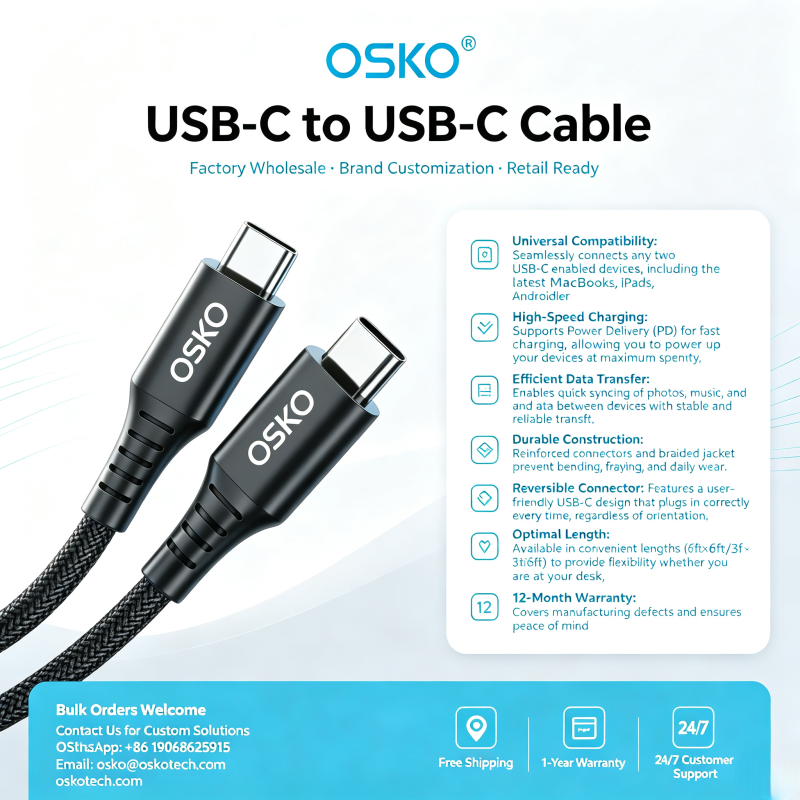
USB-A vs USB-C: Main Differences Explained
1. Connector Design and User Experience
The most obvious difference between USB-A and USB-C is physical design.
USB-A:
Large rectangular connector
Only works in one direction
Requires correct alignment before insertion
Common in older computers and accessories
USB-C:
Smaller oval connector
Fully reversible
Easier to plug in
Designed for modern thin devices
For everyday users, USB-C provides a simpler experience.
A smartphone user no longer needs to check whether the cable is upside down before connecting.
This small improvement has significantly changed how people interact with charging accessories.
2. USB-C vs USB-A Speed Comparison
Many people assume USB-C is automatically faster than USB-A.
However, the connector itself does not determine speed.
The actual performance depends on the USB protocol supported by the cable and device.
For example:
USB 2.0:
Speed: up to 480 Mbps
USB 3.0:
Speed: up to 5 Gbps
USB 3.1:
Speed: up to 10 Gbps
USB 3.2:
Speed: up to 20 Gbps
USB4:
Speed: up to 40 Gbps
A USB-C cable may still only support USB 2.0 speeds if it is designed mainly for charging.
This is why buyers should always check cable specifications instead of only looking at the connector type.
For example:
A USB-C charging cable designed for smartphones may prioritize power delivery, while a USB-C data cable for professional users may require higher transfer speeds.
3. Charging Power: USB-C Has a Major Advantage
One of the biggest differences between USB-A and USB-C is charging capability.
Traditional USB-A charging usually supports lower power output.
Typical USB-A applications include:
Phone charging
Small accessories
Basic electronics
USB-C supports USB Power Delivery (USB PD), which allows significantly higher charging power.
Modern USB-C cables can support:
60W charging
100W charging
140W charging
240W charging with advanced USB-C PD technology
This makes USB-C suitable for:
Smartphones
Tablets
Gaming devices
Laptops
Portable monitors
For example, a 60W USB-C to USB-C cable can charge many laptops and tablets while also supporting smartphone fast charging.
A 240W USB-C PD cable is designed for higher-power applications where traditional USB-A cables cannot provide enough energy.
4. USB-C Supports More Applications
USB-A was mainly designed for simple data transfer and charging.
USB-C is much more versatile.
A single USB-C port can support:
Charging
Power delivery between devices and chargers.
Data Transfer
Moving files between computers, phones, and storage devices.
Video Output
Connecting laptops to:
External monitors
TVs
Professional displays
This multi-function capability has helped USB-C replace many older ports on modern laptops.
Instead of requiring separate HDMI, charging, and data ports, manufacturers can create thinner devices using USB-C.
USB-A vs USB-C: Which Cable Should You Buy?
The right cable depends on your application.
For Smartphone Charging
A USB-C fast charging cable is usually the best choice for modern smartphones.
Recommended specifications:
USB-C connector
PD fast charging support
Reliable internal wiring
Durable outer jacket
For Laptop Charging
Choose:
USB Power Delivery support
Appropriate wattage rating
For example:
60W cable for tablets and lightweight laptops
100W cable for most professional laptops
240W cable for high-power devices
For Older Devices
USB-A cables are still useful when connecting legacy equipment.
Examples:
Older printers
Older cameras
Existing USB accessories
A USB-A to USB-C cable is often the easiest solution for connecting new devices with older chargers or computers.
Engineering Case Study: Selecting the Right USB Cable for a Global Electronics Distributor
A European electronics distributor supplying smartphone accessories contacted OSKO to develop a customized USB-C charging cable for retail markets in Germany and the Netherlands.
Their challenge was balancing:
Competitive retail pricing
Fast charging performance
Long product lifespan
Compatibility with multiple devices
After evaluating customer requirements, OSKO engineers selected:
Braided nylon outer jacket
Reinforced connector structure
USB-C PD charging technology
480 Mbps data transfer capability
Customized packaging for European retail channels
The final OEM USB-C cable solution helped the distributor reduce replacement complaints while offering a reliable charging accessory for smartphones and tablets.
This case demonstrates why cable selection is not only about connector type.
Material quality, internal structure, power capability, and manufacturing consistency all influence the final user experience.
USB-A vs USB-C Future Development
USB-A will not disappear immediately.
Many existing devices still depend on USB-A connections.
However, USB-C is becoming the dominant connector because it provides:
Higher charging power
Better compatibility
Smaller design
Faster performance
More applications
Future USB technology will likely continue improving through:
Faster data speeds
Higher power delivery
Better thermal management
Smarter charging control
Instead of completely replacing old connectors overnight, the industry is gradually transitioning toward USB-C.
Why Choose OSKO for USB-C Cable Manufacturing?
As a professional USB cable manufacturer, OSKO provides OEM and ODM solutions for global customers.
Our capabilities include:
Custom USB-C cable design
USB-A to USB-C cable production
Braided cable manufacturing
PD fast charging cable development
Customized lengths and packaging
Bulk production support
For brands, distributors, and retailers looking for reliable USB cable suppliers, choosing the right manufacturing partner is essential for product quality and customer satisfaction.
Conclusion: USB-C Is the Future, But USB-A Still Has a Role
The comparison between USB-A vs USB-C is not simply about which connector is newer.
USB-A remains useful because of its huge installed base and compatibility.
USB-C has become the future because it offers:
Faster charging
Higher power capability
Better convenience
More versatile applications
For most new devices in 2026, choosing a USB-C cable is the smarter long-term investment.
However, USB-A still remains valuable for connecting older equipment and existing accessories.
Understanding these differences helps consumers, businesses, and procurement teams choose the right cable solution for their needs.
FAQ
What is the main difference between USB-A and USB-C?
USB-A is an older rectangular USB connector mainly used for traditional computers and accessories. USB-C is a newer reversible connector that supports faster charging, higher power delivery, and advanced data transfer features.
Is USB-C faster than USB-A?
USB-C can support faster speeds than USB-A, but speed depends on the USB standard inside the cable. A USB-C cable using USB 2.0 technology may be slower than a USB-A cable using USB 3.0 technology.
Can I use a USB-A charger with a USB-C device?
Yes. You can use a USB-A to USB-C cable to connect older chargers with USB-C devices, but charging speed may be limited compared with a USB-C PD charger.
Is USB-C better for fast charging?
Yes. USB-C supports USB Power Delivery, allowing much higher charging power compared with traditional USB-A connections.
Which cable should I choose for my laptop?
For modern laptops, a USB-C to USB-C cable with Power Delivery support is recommended. Select the wattage according to your laptop requirements.
Will USB-A become obsolete?
USB-A will gradually become less common, but it will continue to exist for many years because many existing devices still use USB-A ports.
Why do USB-C cables have different speeds?
USB-C only describes the connector shape. The internal cable design determines whether it supports USB 2.0, USB 3.x, USB4, or higher performance standards.
