















Today, almost every modern electronic device is moving toward one universal charging standard: USB-C.
From iPhones and Android smartphones to iPads, MacBooks, Windows laptops, tablets, wireless earbuds, and gaming devices, USB-C has quickly replaced older charging technologies.
But many users still have questions:
What exactly is a USB-C charger?
Does a USB-C charger charge faster?
How many watts do I need?
Is a 65W charger safe for my phone?
What is the difference between a normal USB-C charger and a GaN charger?
Choosing the wrong charger can lead to:
Slow charging speeds
Poor device performance
Unnecessary replacement costs
This complete guide explains everything beginners need to know about USB-C chargers, including fast charging technology, wattage selection, GaN advantages, and safety tips.
What Is a USB-C Charger?
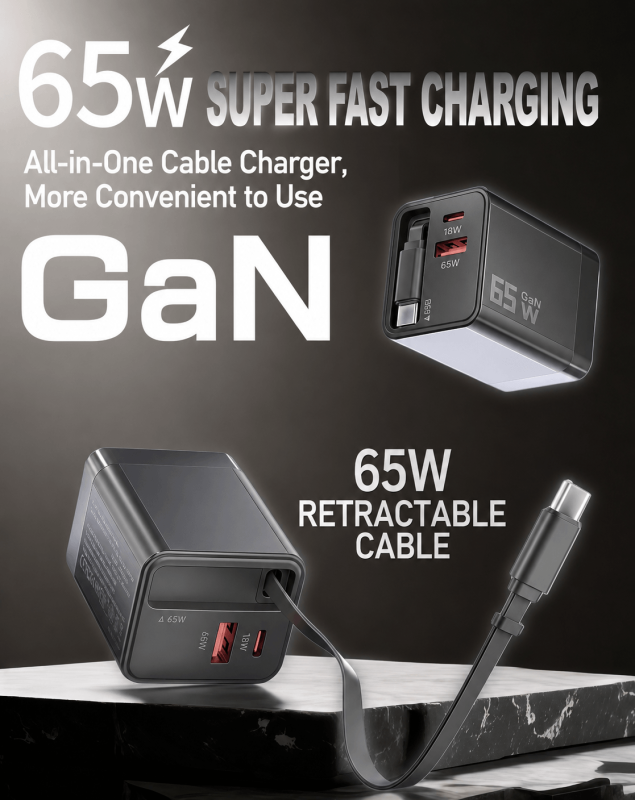
A USB-C charger is a power adapter that uses the USB Type-C connector standard to deliver electricity to compatible electronic devices.
Unlike older USB-A chargers with large rectangular ports, USB-C chargers feature a small oval-shaped connector designed for modern electronics.
USB-C chargers are commonly used for:
iPhone
Android smartphones
iPad
MacBook
Windows laptops
Tablets
Gaming consoles
Portable monitors
Wireless accessories
The biggest advantage of USB-C is that one charging standard can support many different devices.
Key Features of USB-C Chargers
1. Reversible Connector Design
One of the most noticeable improvements of USB-C is its reversible design.
Traditional USB-A connectors require users to insert the plug in the correct direction.
USB-C eliminates this problem.
You can connect the cable:
Upward
Downward
and it works immediately.
Benefits include:
Easier daily use
Less connector damage
Better user experience
2. Compact but Powerful Design
USB-C connectors are smaller than traditional USB connectors while supporting significantly higher power levels.
A single USB-C charger can power:
Small devices like earbuds
Smartphones
Tablets
Professional laptops
This makes USB-C especially useful for travel and workplace setups.
3. Advanced Internal Architecture
A USB-C connector contains 24 pins designed for:
Power delivery
Data transmission
Device communication
Advanced charging protocols
These pins allow USB-C to support technologies such as:
USB Power Delivery (USB PD)
Fast charging
High-speed data transfer
Video output
Why Are USB-C Chargers Better Than Older Chargers?
USB-C technology provides three major improvements compared with traditional chargers.
1. Faster Charging With USB Power Delivery (USB PD)
The biggest advantage of a USB-C charger is fast charging capability.
Older USB-A chargers usually provide:
5W
10W
12W
This means smartphones often required several hours to fully charge.
Modern USB-C chargers use USB Power Delivery (USB PD) technology.
USB PD allows chargers to deliver much higher power:
| Device | Typical Charging Power |
|---|---|
| Wireless earbuds | 5W–10W |
| Smartphone | 20W–30W |
| Tablet | 30W–45W |
| Laptop | 45W–100W |
| High-power devices | Up to 240W |
With a compatible USB-C fast charger, many smartphones can reach around 50% battery within approximately 30 minutes.

2. Smart Power Negotiation
Many users worry:
“Will a 65W USB-C charger damage my phone?”
The answer is no.
USB-C chargers are designed with intelligent power communication.
Before charging begins, the charger and device communicate.
The device tells the charger:
Required voltage
Maximum current
Safe charging level
For example:
A smartphone supporting 25W charging will only receive around 25W from a 65W charger.
A laptop requiring 65W can receive the full output.
The charger does not force extra power into the device.
3. One Charger for Multiple Devices
USB-C reduces the need for multiple chargers.
A single USB-C power adapter can charge:
Smartphone
Tablet
Laptop
Wireless earbuds
For travelers and professionals, this means:
Less weight
Less cable clutter
Easier packing
A high-power USB-C charger can replace several traditional charging bricks.
Understanding USB-C Charger Watts
When shopping for a USB-C charger, you will see specifications such as:
20W
30W
45W
65W
100W
140W
These numbers represent power output.
The formula is:
Power (W) = Voltage (V) × Current (A)
Higher wattage means the charger has more power capacity.
How Many Watts Does Your Device Need?
Smartphone
Most smartphones require:
20W–30W
Examples:
iPhone fast charging
Android fast charging
A 30W USB-C charger is usually sufficient.
Tablet
Most tablets require:
30W–45W
For example:
iPad Pro
Android tablets
Laptop
Laptops require more power.
Typical requirements:
MacBook Air: 45W–67W
MacBook Pro: 67W–140W
Windows laptops: 65W–100W+
For laptops, choose a USB-C charger with enough wattage to maintain charging speed during heavy use.
Is a Higher Watt USB-C Charger Safe?
Yes.
A common misunderstanding is:
“A 100W charger will damage my 20W phone.”
This is incorrect.
USB-C Power Delivery works through negotiation.
The device controls how much power it receives.
Using a higher wattage charger is generally safe as long as:
Charger quality is reliable
Cable supports required power
Device supports USB-C charging
What Is a GaN USB-C Charger?
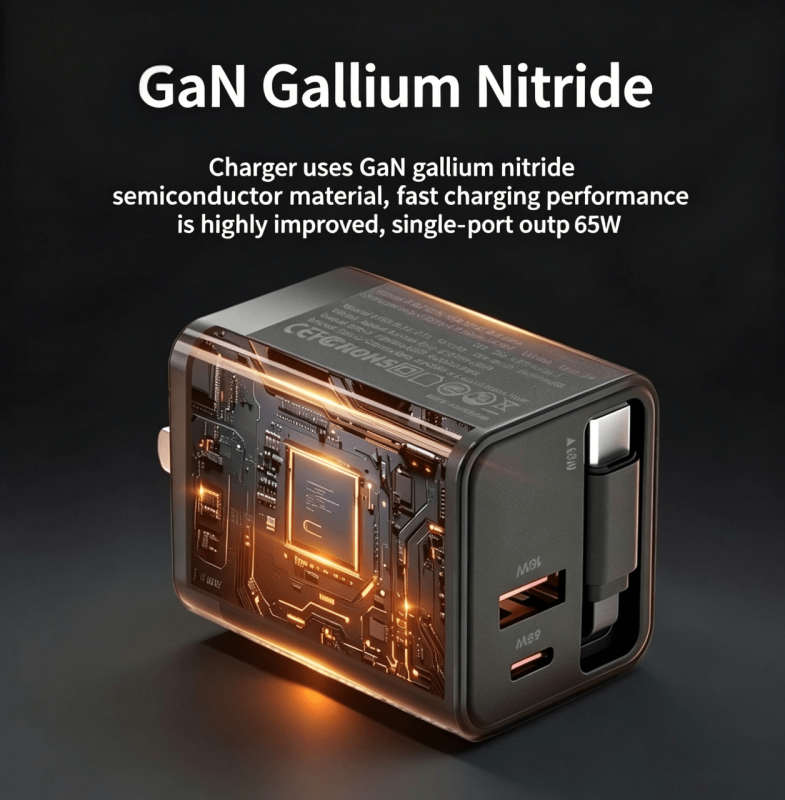
Many modern USB-C chargers use GaN technology.
GaN means:
Gallium Nitride
It is a semiconductor material that replaces traditional silicon components inside chargers.
Advantages of GaN USB-C Chargers
1. Smaller Size
GaN technology allows chargers to be:
Smaller
Lighter
More portable
A 65W GaN charger can be significantly smaller than traditional laptop chargers.
2. Better Efficiency
GaN components transfer electricity more efficiently.
Benefits:
Less energy loss
Lower heat generation
Better performance
3. Improved Travel Experience
For travelers, GaN chargers provide:
More power in less space
Fewer chargers to carry
Faster charging solutions
A compact 100W GaN charger can often replace multiple power adapters.
How to Choose the Right USB-C Charger
Before buying a USB-C power adapter, consider these factors.
1. Check Your Device Charging Requirement
Find your device’s maximum charging speed.
Examples:
Phone → 20W–30W
Tablet → 30W–45W
Laptop → 65W+
Choose a charger that matches your device.
2. Look for USB Power Delivery Support
A quality fast charger should support:
USB PD
PPS (Programmable Power Supply)
PPS is especially important for some Android devices, including Samsung Galaxy fast charging.
3. Choose the Correct Cable
A powerful charger requires a suitable cable.
Examples:
| Charger Output | Recommended Cable |
|---|---|
| 30W | 3A USB-C cable |
| 60W | 3A USB-C cable |
| 100W | 5A E-marker cable |
| 240W | 5A EPR cable |
A low-quality cable may limit charging speed.
4. Consider Multi-Port USB-C Chargers
For travelers and professionals, multi-port chargers are highly practical.
Benefits:
Charge multiple devices simultaneously
Reduce luggage weight
Save outlet space
Popular configurations:
Dual USB-C ports
USB-C + USB-A combination
Three-port GaN chargers
USB-C Charger Safety Tips
A reliable charger should include safety protection features.
Look for:
Over-current protection
Over-voltage protection
Temperature control
Short-circuit protection
Certification compliance
Avoid extremely cheap chargers from unknown manufacturers because poor-quality components may create safety risks.
USB-C Charger vs Traditional USB Charger
| Feature | USB-C Charger | USB-A Charger |
|---|---|---|
| Connector | Oval reversible | Rectangular |
| Charging Speed | Higher | Lower |
| Power Support | Up to 240W | Limited |
| Laptop Charging | Yes | Usually No |
| Modern Device Support | Excellent | Declining |
USB-C has become the preferred charging standard because it combines power, speed, and compatibility.
USB-C Charger OEM and Wholesale Solutions
With USB-C becoming the global charging standard, brands and distributors increasingly need customized charging products.
Professional USB-C charger manufacturers provide:
OEM USB-C chargers
Private label charging products
Custom packaging
Custom power specifications
Bulk production
Typical customers include:
Electronics brands
Retailers
Amazon sellers
Corporate gift suppliers
Mobile accessory distributors
A reliable OEM partner helps businesses create charging solutions that match different markets and customer requirements.
Frequently Asked Questions About USB-C Chargers
Does USB-C charge faster than USB-A?
Yes. USB-C chargers generally support higher power output and faster charging technologies such as USB PD.
Can I use a 65W USB-C charger for my phone?
Yes. Your phone will only draw the power it needs.
Is a GaN charger better than a regular charger?
GaN chargers are usually smaller, more efficient, and better for travel.
Do USB-C chargers work with laptops?
Yes. Many modern laptops support USB-C Power Delivery charging.
Does the cable affect USB-C charging speed?
Yes. The cable must support the required current and power level.
Conclusion: USB-C Chargers Are the Future of Universal Charging
USB-C chargers have transformed how people power their devices.
With:
Faster charging
Smart power management
Universal compatibility
Compact GaN designs
one USB-C charger can now replace multiple traditional adapters.
When choosing a USB-C charger, focus on:
Correct wattage
USB PD support
Cable compatibility
Safety certifications
Build quality
A high-quality USB-C charging solution provides faster performance, safer operation, and a simpler everyday experience.
For consumers and businesses alike, USB-C is becoming the standard technology for modern power solutions.
