















An A to C USB cable is a USB cable with a traditional USB Type-A connector on one end and a USB Type-C connector on the other end. It is widely used for charging smartphones, connecting USB-C accessories, transferring data, and supporting compatibility between older USB-A devices and modern USB-C electronics.
Although USB-C to USB-C cables are becoming the preferred solution for high-power charging, USB-A to USB-C cables remain an important product category in the global electronics market, especially for:
USB accessory brands
Electronics wholesalers
Retail distributors
Amazon sellers
Automotive accessory companies
OEM product developers
For businesses purchasing cables in bulk, understanding the difference between basic and professional-grade USB-A to USB-C cables is essential for reducing returns, improving customer satisfaction, and building reliable products.

What Is an A to C USB Cable?
An A to C USB cable connects a device with a USB-A port to a device with a USB-C port.
The cable contains two different connectors:
USB Type-A Connector
The USB-A connector is the traditional USB interface found on:
Desktop computers
Older laptops
Wall chargers
USB hubs
Car chargers
Industrial equipment
Characteristics:
Rectangular shape
One-way insertion
Widely used for decades
USB Type-C Connector
The USB-C connector is the modern interface used in:
Android smartphones
Tablets
Power banks
Wireless headphones
Gaming devices
Modern accessories
Characteristics:
Oval-shaped design
Reversible plug
Compact size
Supports modern charging technologies
The main advantage of an A to C USB cable is compatibility between older USB-A systems and newer USB-C devices.
Why Are USB-A to USB-C Cables Still Popular?
Although USB-C to USB-C cables are increasing in popularity, USB-A ports are still widely installed worldwide.
Many devices continue to use USB-A connections:
Office computers
Older charging adapters
Vehicle USB ports
Industrial controllers
Public charging stations
USB extension systems
For this reason, bulk USB-A to USB-C cables remain a high-demand product for distributors and retailers.
For OEM buyers, A to C cables provide:
Wide device compatibility
Lower production cost
Large existing market demand
Easy integration into accessory bundles
What Does an A to C USB Cable Look Like?
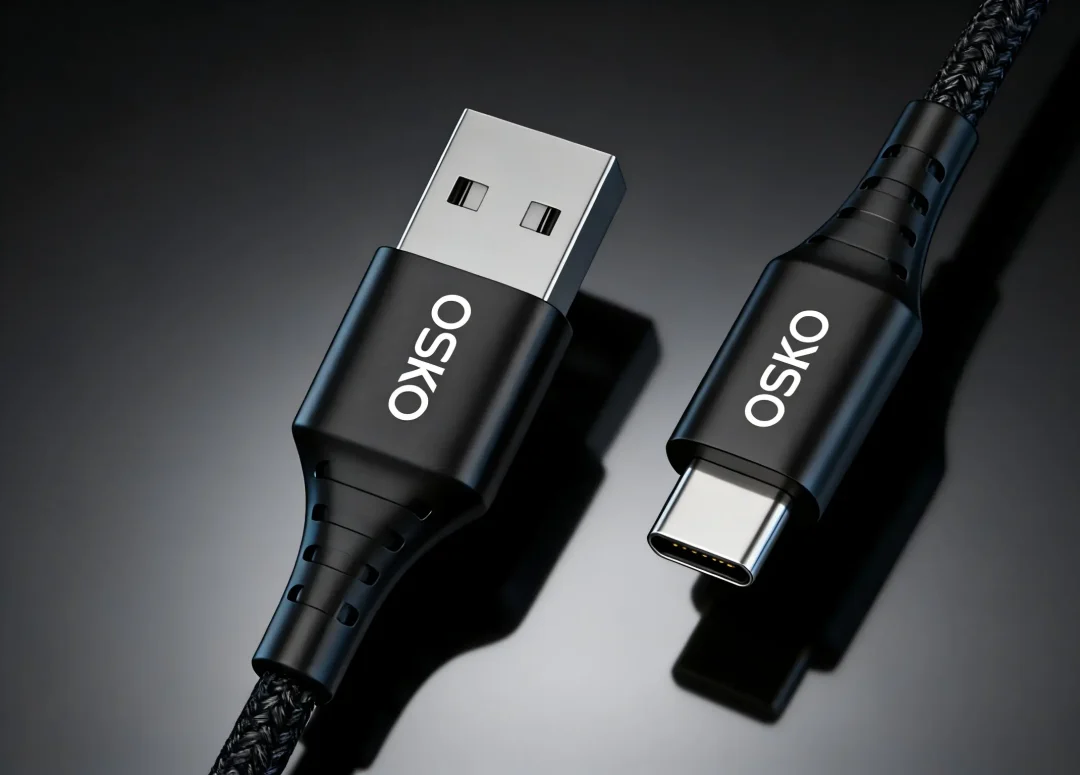
A USB-A to USB-C cable can be identified by its two different connector designs.
USB-A Side
The Type-A connector features:
Large rectangular metal shell
Traditional USB appearance
Fixed insertion direction
USB-C Side
The Type-C connector features:
Small oval shape
Symmetrical design
Reversible connection
Compared with other USB cables:
| Cable Type | Connector Combination | Main Application |
|---|---|---|
| USB-A to USB-C | USB-A + USB-C | Phones, accessories, computers |
| USB-C to USB-C | USB-C + USB-C | Fast charging, laptops |
| USB-A to Micro USB | USB-A + Micro USB | Older Android devices |
| USB-C to Lightning | USB-C + Lightning | Older iPhones |
Are All A to C USB Cables the Same?
No.
Although many USB-A to USB-C cables look identical externally, their internal construction can be completely different.
Performance depends on:
Copper conductor quality
Wire gauge
Cable structure
Shielding design
Connector quality
Manufacturing process
A basic cable may support:
5V charging
2A current
USB 2.0 data transfer
A premium fast charging USB-A to USB-C cable may provide:
5V/3A charging
Improved durability
Better heat control
More stable data transmission
For B2B buyers, selecting the correct specification is more important than appearance.
A to C USB Cable Charging Performance
Can an A to C USB Cable Support Fast Charging?
Yes, but the charging capability depends on the cable design and device compatibility.
Important factors include:
1. Copper Conductor Quality
High-quality cables use:
Pure copper conductors
Multi-strand copper wire
Low-resistance structures
Low-quality cables may use:
Copper-clad aluminum (CCA)
Smaller conductors
Poor electrical materials
This can cause:
Voltage drop
Slow charging
Excessive heat
Reduced lifespan
2. Wire Gauge (AWG)
AWG indicates conductor thickness.
Lower AWG numbers mean thicker wires.
Common specifications:
| Application | Wire Gauge |
|---|---|
| Basic charging cable | 28AWG |
| Standard fast charging cable | 26AWG |
| Higher current cable | 24AWG |
| Heavy-duty design | 22AWG |
Thicker conductors help:
Reduce resistance
Improve current stability
Control heat generation
Does an A to C USB Cable Support USB PD?
Generally, USB Power Delivery (USB PD) is optimized for USB-C to USB-C connections.
A USB-A to USB-C cable usually supports:
Standard USB charging
Quick Charge technologies
Basic fast charging
However, it normally does not support:
100W laptop charging
140W charging
240W USB PD 3.1 EPR charging
High-power charging applications usually require:
USB-C to USB-C cable
E-marker chip
USB PD protocol support
Data Transfer Speed of USB-A to USB-C Cable
Not all A to C cables provide the same data performance.
Common specifications:
| Cable Type | Speed |
|---|---|
| USB 2.0 | 480Mbps |
| USB 3.0 | 5Gbps |
| USB 3.2 | Up to 20Gbps |
Many low-cost USB-A to USB-C cables are designed mainly for charging and only support USB 2.0 speeds.
For applications such as:
External SSD connection
Large file transfer
Industrial equipment
buyers should confirm the required USB specification before purchasing.
Materials Used in High-Quality A to C USB Cables
Professional USB cable manufacturers focus on internal construction.
Conductor Materials
Recommended:
Pure copper wire
Advantages:
Higher conductivity
Lower resistance
Better charging stability
Avoid:
Copper-clad aluminum (CCA)
because it provides:
Higher resistance
Lower current capability
Shorter lifespan
Cable Jacket Materials
Common options:
PVC
Advantages:
Low cost
Good flexibility
TPE
Advantages:
Better flexibility
Improved durability
Nylon Braided Jacket
Advantages:
Premium appearance
Abrasion resistance
Higher mechanical strength
For retail products, braided USB-A to USB-C cables are increasingly popular because consumers associate them with better durability.
How Are A to C USB Cables Manufactured?
A professional USB-A to USB-C cable manufacturer follows controlled production procedures.
The manufacturing process includes:
1. Wire Preparation
Processes include:
Copper drawing
Stranding
Insulation extrusion
2. Connector Assembly
Includes:
Terminal welding
Connector molding
Strain relief production
3. Electrical Testing
Professional factories test:
Continuity
Resistance
Voltage stability
Short circuit protection
4. Reliability Testing
Including:
Bending tests
Pull force tests
Connector insertion tests
Certifications Required for USB-A to USB-C Cable Manufacturing
For global markets, especially the US and EU, compliance documentation is important.
Common certifications include:
| Certification | Purpose |
|---|---|
| RoHS | Controls hazardous substances |
| REACH | Chemical compliance |
| ISO9001 | Quality management |
| UL | Safety recognition |
| FCC | Electronic compliance |
A reliable OEM USB cable factory should provide:
Test reports
Material declarations
Quality records
Production traceability
How to Choose an OEM USB-A to USB-C Cable Manufacturer?
Before placing bulk orders, buyers should evaluate:
Technical Capability
Ask:
What charging current does the cable support?
What AWG wire sizes are available?
Do you support custom lengths?
Can you provide braided designs?
Manufacturing Capability
Check:
Factory experience
Production capacity
Quality control system
OEM customization ability
Quality Control
Confirm:
Pure copper materials
Electrical testing
Connector durability testing
Compliance documents
Why Work Directly With an A to C USB Cable Factory?
For brands and wholesalers, direct factory cooperation provides:
Cost Advantages
Better pricing
Lower supply chain costs
Stable production
Customization Options
Including:
Cable length
Color
Logo printing
Packaging
Connector design
Quality Control
Direct manufacturing improves:
Product consistency
Delivery reliability
Technical communication
Conclusion: Choosing the Right A to C USB Cable
An A to C USB cable remains an important connection solution between traditional USB-A devices and modern USB-C electronics.
Although the cable design appears simple, real performance depends on:
Copper conductor quality
AWG wire size
Connector construction
Charging capability
Data transmission design
Factory quality control
For companies sourcing bulk USB-A to USB-C cables, selecting an experienced OEM manufacturer is more important than choosing the lowest price.
A reliable USB cable supplier should provide:
Stable production
Certified materials
Engineering support
Custom manufacturing solutions
FAQ About A to C USB Cables
1. What does A to C USB cable mean?
An A to C USB cable means one end uses USB Type-A and the other end uses USB Type-C. It connects older USB systems with modern USB-C devices.
2. Can an A to C USB cable fast charge phones?
Yes. Many A to C cables support fast charging when paired with compatible chargers and devices.
3. Is USB-C to USB-C better than A to C?
For high-power charging and high-speed data transfer, USB-C to USB-C provides better performance. A to C cables are mainly used for compatibility.
4. How do I choose an OEM A to C USB cable supplier?
Choose a manufacturer with:
ISO9001 certification
RoHS compliance
Pure copper materials
Strong QC systems
OEM customization capability
