
Introduction: Can a USB Cable Charge and Transfer Data at the Same Time?
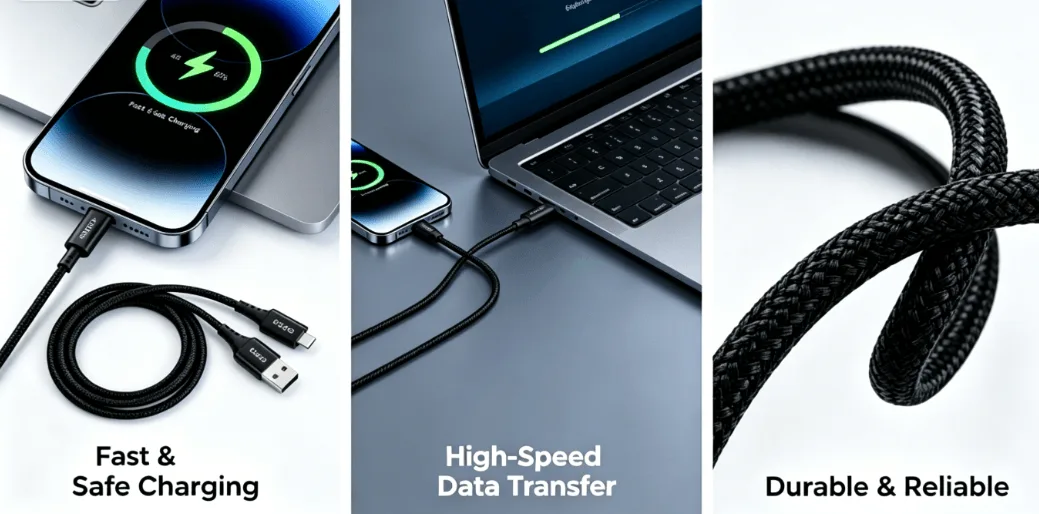
Many users assume that a USB cable can either charge a device or transfer data, but not both. In reality, most modern USB cables are designed to handle power delivery and data transmission simultaneously.
Whether you’re transferring photos from a smartphone, backing up files to a computer, or connecting external devices, charging and data transfer can often occur at the same time. However, this depends on several factors, including the cable design, connector type, device compatibility, and supported protocols.
Understanding these conditions can help you choose the right cable for reliable charging and efficient data communication.
How Does a USB Cable Carry Power and Data Simultaneously?
A USB cable contains multiple internal conductors, each responsible for a different function.
The power conductors carry electrical current from the power source to the device, while separate data conductors transmit digital signals between connected devices.
Because these circuits operate independently inside the cable, charging and data transmission can occur concurrently without interfering with one another when the cable is properly designed.
This is one of the key advantages of modern USB-C cables and advanced USB standards.
What Wires Inside the Cable Handle Charging and Data?
To understand simultaneous charging and data transfer, it is important to understand the cable’s internal structure.
Power Wires (VBUS and GND)
The VBUS wire delivers power from the charger or host device.
The GND wire completes the electrical circuit and provides a return path for current.
Together, these wires are responsible for charging the connected device.
Data Wires (D+ and D-)
In USB 2.0 cables, data communication is handled by the D+ and D- differential pair.
These wires transmit digital signals independently from the power conductors.
High-Speed Differential Pairs
In USB 3.0, USB 3.2, USB4, and Thunderbolt cables, additional TX and RX differential pairs are included.
These high-speed channels support significantly faster data transmission while charging continues through separate power conductors.
As a result, modern USB-C cables can support both functions simultaneously.
What Conditions Must Be Met for Simultaneous Charging and Data Transfer?
Although USB technology supports both functions, several conditions must be satisfied.
The Cable Must Support Data Transmission
Not every charging cable is a true data cable.
Many low-cost cables contain only power conductors and do not include data wires.
These cables can charge devices but cannot transfer files.
To enable simultaneous charging and data transfer, the cable must include:
Data conductors
Proper shielding
Complete pin connections
A full-featured USB-C cable is usually required for high-speed applications.
The Connected Devices Must Support Data Communication
Even with a capable cable, both connected devices must support data transfer.
For example:
Smartphone ↔ Computer
Tablet ↔ Laptop
External SSD ↔ PC
These devices are designed to exchange data while power is delivered.
However, a basic wall charger typically provides power only and does not establish a data connection.
In such cases, charging occurs without data transfer.
The USB Protocol Must Allow Concurrent Operation
Modern USB standards are specifically designed to support simultaneous power and data communication.
Examples include:
USB 2.0
USB 3.2
USB4
Thunderbolt 3
Thunderbolt 4
Thunderbolt 5
These standards separate power delivery and data channels, allowing both functions to operate concurrently.
This capability is especially important for smartphones, external drives, docking stations, and portable displays.
Can Fast Charging and Data Transfer Work Together?
Yes, but there are limitations.
Modern USB-C cables supporting USB Power Delivery (PD) can simultaneously provide fast charging and high-speed data transfer.
For example:
60W USB-C charging + 5Gbps data
100W USB-C charging + 10Gbps data
240W USB-C charging + USB4 40Gbps data
However, the cable must be designed for both power and data performance.
Many cables advertised as fast-charging cables only support charging and offer little or no data capability.
Therefore, buyers should always verify both the power rating and data specification.
Why Do Some Cables Charge but Not Transfer Data?
This is one of the most common user complaints.
Several factors may cause this issue.
Charge-Only Cable Design
Some manufacturers intentionally remove data conductors to reduce costs.
These cables can supply power but cannot establish a data connection.
Damaged Data Wires
Repeated bending or pulling may damage the internal data conductors while leaving power wires intact.
As a result, charging continues but file transfer fails.
Incorrect Device Settings
Many smartphones require users to manually enable:
File Transfer Mode
MTP Mode
USB Data Mode
Without selecting the proper mode, the device may only charge.
Does Data Transfer Affect Charging Speed?
In most situations, charging and data transfer operate independently.
However, under heavy data loads, the device may consume more power for processing and communication.
This can slightly reduce the net charging speed.
For example:
Copying large video files
Running external SSDs
Using USB-C docking stations
Streaming high-resolution video
The device may draw additional power, making charging appear slower even though power delivery remains active.
Why Shielding Is Important During Simultaneous Charging and Data Transfer
When charging current and high-speed data signals travel through the same cable, electromagnetic interference (EMI) becomes a concern.
Premium cables address this challenge through:
Aluminum foil shielding
Braided metal shielding
Twisted pair data wires
Multi-layer isolation structures
These features help maintain signal integrity while power is delivered.
Without proper shielding, users may experience:
Data errors
Signal drops
Unstable charging
Reduced transfer speeds
This is why high-quality USB-C cables invest heavily in internal shielding design.
How to Choose a Cable That Supports Charging and Data Transfer
Before purchasing a cable, verify the following specifications.
Check the Data Rating
Look for:
USB 2.0 (480Mbps)
USB 3.2 (5Gbps–20Gbps)
USB4 (40Gbps)
Thunderbolt 4 or 5
Check the Charging Rating
Choose the appropriate power level:
60W
100W
140W
240W
Verify Certifications
Reliable cables often feature:
USB-IF Certification
USB4 Certification
Thunderbolt Certification
Confirm Full-Featured Cable Design
A full-featured USB-C cable supports:
Fast charging
Data transfer
Video output
Device communication
This offers maximum compatibility and future-proof performance.
Conclusion
A modern USB cable can absolutely charge and transfer data simultaneously, provided the cable and connected devices support both functions.
The key requirements include:
A data-capable cable
Proper internal conductors
Compatible devices
Supported USB protocols
Effective EMI shielding
As USB-C, USB4, and Thunderbolt technologies continue to evolve, simultaneous charging and data transfer have become standard features for professional and consumer devices alike.
When selecting your next USB-C cable, don’t focus only on charging wattage. Verify the data specification as well. A high-quality full-featured cable ensures faster charging, stable data transmission, and a better overall user experience.
Frequently Asked Questions
Can USB-C charge and transfer data at the same time?
Yes. Most USB-C cables that include both power and data conductors can perform charging and data transfer simultaneously.
Why does my cable charge but not transfer files?
The cable may be charge-only, the data wires may be damaged, or the device may not be set to file transfer mode.
Does fast charging stop during data transfer?
No. Fast charging and data transfer can operate concurrently if the cable and devices support both functions.
What is the best cable for charging and data transfer?
A full-featured USB-C cable with USB4 or Thunderbolt certification offers the best combination of fast charging, high-speed data transfer, and long-term reliability.
Looking for USB-C cables that support fast charging and reliable data transfer at the same time? OSKO offers full-featured USB-C cables with high-speed data transmission, PD fast charging, premium shielding, and OEM/ODM customization services. Contact our team today to find the right cable solution for your project.