















Introduction: Why USB Cable Speeds Are Still Confusing Today
USB technology has become one of the most important connection standards in modern electronics. From smartphones and laptops to external SSDs, monitors, and industrial equipment, USB cables are used almost everywhere.
However, as USB technology continues evolving, choosing the right cable has become more complicated.
Many users ask:
Why do two USB-C cables look exactly the same but have completely different performance?
One USB-C cable may only support basic charging and 480Mbps data transfer, while another USB-C cable can deliver 240W charging power and transfer data at speeds up to 40Gbps.
The reason is simple:
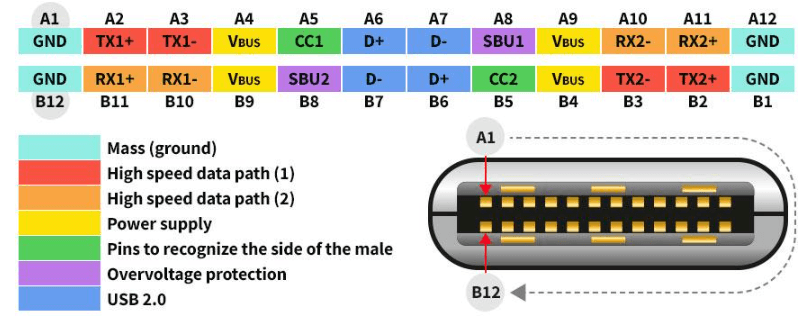
USB-C is only the connector design. It does not define charging power, data speed, or performance.
The actual capability depends on the USB standard supported inside the cable.
Understanding the difference between USB 2.0, USB 3.2, USB4, and USB-C cable specifications helps consumers, engineers, and procurement teams select the right solution for their applications.
For businesses purchasing customized USB cables, understanding these standards is also essential because cable performance directly affects product reliability, user experience, and customer satisfaction.
USB Evolution: From USB 1.0 to USB4
The development of USB technology reflects the changing needs of digital devices.
As devices became faster and files became larger, USB standards continued improving to provide higher speed, better power delivery, and broader compatibility.
| USB Standard | Release Year | Maximum Data Speed | Typical Applications |
|---|---|---|---|
| USB 1.0 | 1996 | 12Mbps | Basic computer peripherals |
| USB 2.0 | 2000 | 480Mbps | Charging, keyboards, printers, smartphones |
| USB 3.0 | 2008 | 5Gbps | External drives, cameras, file transfer |
| USB 3.1 | 2013 | 10Gbps | Professional storage applications |
| USB 3.2 | 2017 | Up to 20Gbps | High-speed data workflows |
| USB4 | 2019 | Up to 40Gbps | SSDs, displays, professional systems |
USB 1.0: The Beginning of Universal Connectivity
Before USB became popular, connecting computer accessories was often inconvenient.
Different devices required different connectors, making setup complicated for consumers and businesses.
USB 1.0 was introduced in 1996 to create a universal connection method.
Although the maximum speed was only 12Mbps, it solved an important problem:
Easier device connection
Reduced connector confusion
Standardized computer accessories
USB 1.0 created the foundation for future USB development.
USB 2.0: The Standard That Changed Everyday Electronics
USB 2.0 launched in 2000 and became the most widely adopted USB generation for many years.
With speeds up to 480Mbps, USB 2.0 provided enough performance for common applications:
Digital cameras
Printers
External hard drives
Mobile devices
Basic data synchronization
Even today, many USB-C charging cables still use USB 2.0 technology.
Why?
Because many users primarily need charging rather than ultra-fast data transfer.
For example:
A smartphone charging cable used with a wall charger does not always require USB4-level performance.
This is why many modern fast charging cables support:
High power charging
USB Power Delivery
Reliable daily use
while maintaining USB 2.0 data speeds.
USB 3.0: When USB Became a High-Speed Data Interface
USB 3.0 represented a major improvement.
Increasing the speed from 480Mbps to 5Gbps allowed users to transfer much larger files faster.
This became important as digital content expanded.
Common USB 3.0 applications include:
HD video transfer
External SSD storage
Camera equipment
Backup systems
Professional workflows
For businesses and content creators, faster USB transfer speeds reduced waiting time and improved productivity.
USB 3.1 and USB 3.2: Faster Performance, More Confusing Names
As USB technology improved, naming became more difficult for consumers.
Many users see terms like:
USB 3.0
USB 3.1 Gen 1
USB 3.2 Gen 1
and assume they represent completely different technologies.
However, some naming changes created overlap between generations.
The most important factor is not the marketing name.
The important specifications are:
Actual transfer speed
Supported USB generation
Cable construction
Device compatibility
For example:
A cable labeled USB 3.2 may not always support the maximum 20Gbps speed.
Always check the detailed specification before purchasing.
USB4: The Future of High-Speed USB Connectivity
USB4 represents the latest major advancement in USB technology.
With speeds reaching up to 40Gbps, USB4 supports demanding applications such as:
Professional video editing
External NVMe SSD storage
High-resolution monitors
Advanced docking stations
USB4 also improves compatibility with modern computing systems.
For professionals who frequently transfer large files, USB4 cables provide significant advantages compared with traditional USB 2.0 charging cables.
However, USB4 performance requires:
USB4-compatible devices
USB4-compatible ports
Properly designed USB4 cables
A USB-C connector alone does not guarantee USB4 performance.
USB-C vs USB Standards: The Most Important Difference
One of the biggest misunderstandings in the cable industry is confusing USB-C with USB speed standards.
USB-C means:
The physical connector shape.
USB 2.0, USB 3.2, and USB4 mean:
The communication technology inside the cable.
Two cables can have identical USB-C connectors but different capabilities.
Example:
Cable A:
USB-C connector
USB 2.0
480Mbps
Suitable for charging and basic synchronization
Cable B:
USB-C connector
USB 3.2 Gen 2
10Gbps
Suitable for SSD and large file transfer
Cable C:
USB-C connector
USB4
40Gbps
Suitable for professional applications
The outside appearance does not tell the complete story.

Why Cable Design Matters for USB Performance
A high-performance USB cable is not simply a connector with wires inside.
Engineering design determines:
Signal stability
Power efficiency
Heat control
Durability
Transfer reliability
For high-power USB-C cables, components such as E-Marker chips become increasingly important.
An E-Marker chip allows the cable to communicate its capability to connected devices.
This helps support:
Higher charging power
Safer power negotiation
Better compatibility
For example, USB-C cables supporting 100W or 240W charging often require advanced internal design to manage higher current levels.
Engineering Case Study: OSKO Custom USB-C Cable Solution for European Laptop Accessories Brand
A European electronics accessory distributor wanted to develop a custom USB-C charging cable for the German and Dutch markets.
Their main challenges were:
Customers required laptop charging support
The cable needed strong durability for daily office use
Retail packaging required clear specification labeling
Different devices required stable compatibility
OSKO engineering team designed a customized USB-C to USB-C cable solution based on:
100W Power Delivery support
E-Marker chip integration
Reinforced connector structure
Nylon braided outer jacket
Customized OEM packaging
During testing, OSKO evaluated:
Charging stability
Connector durability
Cable bending performance
Compatibility with laptops and tablets
The final solution helped the customer create a reliable charging product suitable for European retail distribution.
This case demonstrates that USB cable manufacturing is not only about producing connectors. It requires engineering knowledge of power delivery, signal transmission, materials, and application requirements.
How to Choose the Right USB Cable
Choosing the correct USB cable depends on your actual requirements.
For Smartphone Charging
Recommended:
USB-C charging cable
USB 2.0 data speed is usually enough
60W charging capability provides future compatibility
For Tablets and Laptops
Recommended:
USB-C PD cable
60W–240W power support depending on device requirements
E-Marker chip for high-power applications
For External SSD and Professional Data Transfer
Recommended:
USB 3.2 or USB4 cable
High-speed data certification
Quality shielding design
For OEM Product Development
Businesses should consider:
Required charging power
Target market regulations
Packaging requirements
Custom length
Logo printing
Certification needs
Working with an experienced USB cable manufacturer helps reduce product failures and improve market competitiveness.
FAQ: USB Standards and USB-C Cable Speed
Are all USB-C cables the same speed?
No. USB-C only describes the connector shape. USB-C cables can support different speeds, including USB 2.0, USB 3.2, and USB4.
Is USB4 faster than USB 3.2?
Yes. USB4 can support up to 40Gbps, while USB 3.2 can support up to 20Gbps depending on the version.
Can a USB-C cable support fast charging but slow data transfer?
Yes. Many high-power charging cables support USB 2.0 data speeds because charging and data transfer are separate technologies.
Does USB-C mean my cable supports 40Gbps?
No. A USB-C connector does not guarantee USB4 performance. The cable specification must explicitly support USB4.
Which USB cable is best for laptops?
For laptops, choose a USB-C PD cable with sufficient wattage, such as 100W or higher, depending on your laptop power requirement.
Do longer USB-C cables reduce speed?
Longer cables can affect signal performance if they are not properly designed. High-speed USB4 cables require advanced engineering to maintain stable transmission.
Conclusion: Understanding USB Standards Helps You Choose Better Cables
USB technology has evolved from a simple computer connection system into a complete charging and data ecosystem.
From USB 1.0 to USB4, each generation improved speed, power capability, and device compatibility.
However, the most important lesson remains:
USB-C does not automatically mean fast.
The real performance depends on the USB standard, cable design, and device compatibility.
For consumers, understanding USB specifications helps avoid buying the wrong cable.
For businesses, choosing an experienced OEM USB cable manufacturer ensures better quality, reliability, and market competitiveness.
As USB technology continues evolving, high-quality cable engineering will remain essential for delivering faster, safer, and more reliable connections.
