















Introduction: Why Thunderbolt and USB-C Are Often Confused
Modern laptops and electronic devices are becoming thinner, faster, and more powerful. As manufacturers remove traditional ports, one connector has become increasingly common: USB-C.
Today, USB-C ports can be found on MacBooks, Windows laptops, smartphones, tablets, monitors, docking stations, and external storage devices.
However, many users notice something confusing:
Two ports may look exactly the same, but their performance can be completely different.
One USB-C port may only support charging and basic data transfer, while another may connect to multiple monitors, transfer large files at extremely high speeds, and power professional workflows.
This confusion usually comes from misunderstanding the difference between USB-C and Thunderbolt.
The key point is:
USB-C describes the connector shape, while Thunderbolt describes an advanced connectivity technology.
A USB-C connector does not automatically mean Thunderbolt performance.
Understanding the difference between Thunderbolt port vs USB-C helps consumers, engineers, and procurement teams choose the correct cable and avoid compatibility problems.
What Is a Thunderbolt Port?
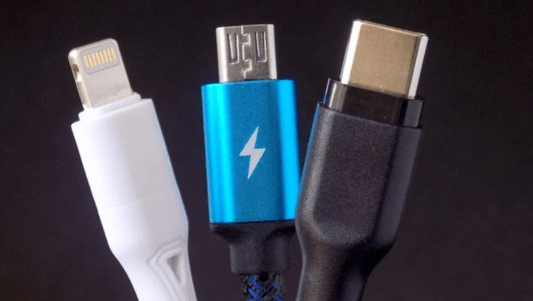
A Thunderbolt port is a high-performance connection technology developed by Intel in collaboration with Apple. It uses the same physical USB-C connector but adds much more advanced capabilities.
Unlike a standard USB-C port, a Thunderbolt port combines multiple functions into one connection:
High-speed data transfer
Display output
Power delivery
External storage expansion
Docking station support
For professional users, Thunderbolt creates a single-cable solution for demanding applications.
For example, a video editor can connect:
External SSD storage
4K monitors
Laptop charging
Additional USB accessories
through one Thunderbolt connection.
This makes Thunderbolt especially popular among:
Content creators
Engineers
Designers
Photographers
Video production professionals
Business users with docking stations
Thunderbolt Performance Advantages
The biggest advantage of Thunderbolt is bandwidth.
Thunderbolt 3 and Thunderbolt 4 support up to:
40Gbps data transfer speed
This is significantly faster than many traditional USB connections.
High bandwidth allows users to:
Transfer large video files quickly
Edit media directly from external drives
Connect multiple displays
Use professional accessories
For example, moving a large 4K video project from an external SSD can take significantly less time with a Thunderbolt-compatible setup compared with a basic USB connection.
What Is USB-C?
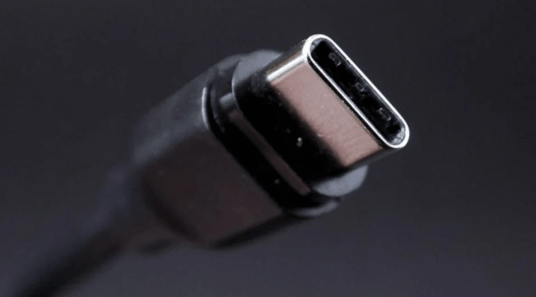
USB-C is a physical connector standard designed to replace older USB connectors such as USB-A and Micro USB.
Its biggest improvement is the reversible design.
Unlike traditional USB connectors, USB-C can be inserted in either direction, making everyday connections easier.
However, USB-C itself does not define performance.
A USB-C cable or port may support different technologies, including:
USB 2.0
USB 3.2
USB4
USB Power Delivery
DisplayPort Alt Mode
This means two USB-C cables can look identical but offer completely different capabilities.
For example:
A basic USB-C cable may support:
Charging
480Mbps data transfer
A high-performance USB-C cable may support:
100W or 240W charging
40Gbps data transfer
External display connection
The connector is the same, but the internal design and supported standards are different.
Thunderbolt vs USB-C: Key Differences
Understanding USB-C vs Thunderbolt requires looking beyond the connector appearance.
1. Data Transfer Speed Difference
The biggest difference between Thunderbolt and USB-C is data performance.
Standard USB-C speeds depend on the USB version.
Examples:
USB 2.0: Up to 480Mbps
USB 3.2 Gen 1: Up to 5Gbps
USB 3.2 Gen 2: Up to 10Gbps
USB4: Up to 40Gbps
Thunderbolt 3 and Thunderbolt 4:
Up to 40Gbps
For everyday charging and phone syncing, standard USB-C is usually enough.
For professional applications such as:
External SSD editing
Large database transfer
Video production
High-resolution displays
Thunderbolt provides a clear advantage.
2. Display Support
Another major difference is video capability.
Many USB-C ports support DisplayPort Alt Mode, allowing connection to external monitors.
However, capability depends on the device manufacturer.
Some USB-C ports support:
Charging only
Others support:
Charging + data
Others support:
Charging + data + video
Thunderbolt ports provide more consistent display support.
Thunderbolt 4 can support:
Multiple 4K displays
High-resolution monitors
Professional docking solutions
This makes Thunderbolt popular among users who rely on multi-screen workstations.
3. Power Delivery Capability
Both Thunderbolt and USB-C can support USB Power Delivery (USB PD).
Depending on implementation, USB-C charging cables can support different power levels:
60W
100W
140W
240W
However, charging performance depends on:
Charger + Cable + Device
A 240W USB-C cable does not force a laptop to charge at 240W.
The device determines how much power it accepts.
High-power USB-C cables often include an E-Marker chip, which allows communication between the charger, cable, and device.
This improves safety and ensures correct power delivery.
Why Two USB-C Cables Can Perform Differently
Many consumers assume:
“USB-C is USB-C, so every cable should work the same.”
This is one of the biggest mistakes when purchasing charging accessories.
The internal construction determines performance.
A USB-C cable may differ in:
Cable Structure
High-performance cables require:
Better internal conductors
Improved shielding
Higher-quality connectors
Better signal management
Poor-quality cables may experience:
Slow charging
Connection interruptions
Reduced data speeds
E-Marker Chip Technology
For high-power applications, E-Marker chips are important.
They allow devices to identify:
Maximum charging capability
Current capacity
Supported protocols
This is especially important for:
Laptop charging
100W charging
240W PD applications
Data Line Design
High-speed cables require additional internal wiring designed for faster communication.
A charging-focused USB-C cable may not support:
External SSD speeds
Thunderbolt devices
Professional workflows
How to Choose Between Thunderbolt Cable and USB-C Cable?
Choosing between a Thunderbolt cable and USB-C cable depends mainly on how you use your devices.
Not every user needs Thunderbolt performance.
For many people, a reliable USB-C charging cable provides everything they need.
The correct choice depends on your application.
For Smartphones and Daily Charging
If your main purpose is charging:
Smartphones
Tablets
Power banks
Wireless accessories
A standard USB-C charging cable is usually enough.
Important factors include:
Charging power support
Cable durability
Connector quality
Compatibility
For example, a 60W USB-C cable can comfortably support many smartphones, tablets, and portable devices.
A higher-power 100W or 240W USB-C cable may be more suitable for users who also charge laptops.
In these situations, paying extra for Thunderbolt capability may not provide noticeable benefits.
For Laptop Users
Laptop users need to consider their workflow.
A basic USB-C laptop charging cable may be sufficient for:
Office work
Web browsing
Online meetings
Document editing
However, professionals working with large files may benefit from Thunderbolt.
Thunderbolt is especially useful for:
MacBook Pro users
Video editors
Graphic designers
Engineers
Photographers
Typical applications include:
Connecting external NVMe SSD storage
Running multiple monitors
Using docking stations
Managing professional equipment
For External SSD and Large File Transfer
If you frequently transfer large files, cable speed becomes important.
Examples:
4K video projects
RAW photography files
Game libraries
Engineering datasets
A standard charging USB-C cable may create a bottleneck.
A high-speed USB-C cable supporting USB4 or Thunderbolt can significantly improve workflow efficiency.
For professional users, the cable is not just an accessory.
It becomes part of the productivity system.
USB-C vs Thunderbolt: Which One Is Better?
There is no universal answer.
The better option depends on the user’s requirements.
USB-C Advantages
USB-C offers:
Wide compatibility
Lower cost
Multiple charging options
Easy availability
Support for modern devices
It is ideal for:
Everyday charging
Travel
Home office setups
General device connections
Thunderbolt Advantages
Thunderbolt provides:
Higher bandwidth
More reliable high-performance connectivity
Better support for professional workflows
Advanced docking capability
It is ideal for:
Creative professionals
Business workstations
High-speed storage users
Multi-monitor setups
The best cable is not always the most powerful one.
It is the one that matches your actual needs.
Common Mistakes When Buying USB-C and Thunderbolt Cables
Many buyers make mistakes because cable specifications are often confusing.
Understanding these mistakes can help avoid unnecessary purchases.
Mistake 1: Assuming Every USB-C Cable Supports Fast Charging
A USB-C connector does not guarantee fast charging.
Charging performance depends on:
Cable rating
Charger output
Device capability
A basic USB-C cable may not support:
100W charging
240W PD charging
Laptop power requirements
Always check the cable specifications before purchase.
Mistake 2: Buying a Thunderbolt Cable for a USB-C Only Device
A Thunderbolt cable can work with many USB-C devices, but it does not automatically upgrade performance.
For example:
A Thunderbolt 4 cable connected to a USB-C 2.0 port will still operate at the device’s maximum capability.
The weakest component determines the final performance.
Mistake 3: Ignoring Cable Quality
Performance is not only about standards.
Cable construction matters.
A professional-grade USB-C cable should consider:
Conductor quality
Shielding design
Connector durability
Heat management
Bend resistance
Poor-quality cables may cause:
Charging interruptions
Data transfer failures
Short lifespan
Engineering Case Study: Designing Reliable USB-C Cables for Professional Buyers
A European electronics distributor approached OSKO looking for a customized USB-C cable solution for laptop accessories.
Their customers included:
Business laptop users
Home office professionals
IT equipment suppliers
The original challenge was that standard USB-C cables created several complaints:
Some cables could not support high-power laptop charging
Data transfer performance was inconsistent
Cable durability was insufficient for daily business use
From an engineering and procurement perspective, the buyer needed more than a low-cost cable.
They required:
Stable power delivery
Reliable connector performance
Consistent production quality
OEM customization capability
OSKO engineers evaluated the application requirements and developed a USB-C to USB-C cable solution with:
High-quality copper conductors
Reinforced stress points
Braided outer protection
E-Marker chip support for high-power charging applications
Customized length and packaging options
During testing, the cable was evaluated for:
Charging stability
Connector durability
Repeated bending performance
Data communication reliability
The final solution helped the distributor provide a more reliable accessory option for business customers.
This case demonstrates an important point:
For professional buyers, choosing a USB-C cable is not only about price.
It is about matching cable design, manufacturing capability, and application requirements.
Why OEM USB-C Cable Manufacturing Capability Matters
For brands, distributors, and retailers, the cable itself is only part of the product.
The manufacturing partner behind the cable directly affects:
Product consistency
Quality control
Certification support
Customization options
Long-term supply stability
A professional USB-C cable manufacturer should be able to support:
Custom Specifications
Including:
Cable length
Connector design
Material selection
Color options
Logo printing
Packaging customization
Different Market Requirements
Different regions have different expectations.
For example:
United States Market
Customers often prioritize:
Fast charging
Laptop compatibility
Durable braided cables
Retail packaging quality
Germany Market
Buyers often focus on:
Product reliability
Technical specifications
Certification compliance
Long-term durability
Australia Market
Users commonly value:
Strong everyday performance
Travel-friendly designs
Heat-resistant materials
Netherlands Market
Consumers and businesses often prefer:
Sustainable product choices
Minimal packaging
Reliable multi-device compatibility
Understanding regional expectations helps manufacturers create products that fit different markets.
Future of USB-C and Thunderbolt Technology
The future of connectivity is unlikely to be about replacing USB-C immediately.
Instead, technology will continue improving through:
Faster data transfer
Higher charging efficiency
Better power management
More intelligent device communication
USB-C has already become the foundation of modern connectivity because it balances:
Convenience
Compatibility
Performance
Thunderbolt continues pushing the limits for professional applications.
Meanwhile, USB-C remains the practical choice for everyday users.
Both technologies will continue existing because they serve different purposes.
Final Thoughts: Thunderbolt and USB-C Serve Different Needs
The difference between Thunderbolt and USB-C is not about which technology is universally better.
It is about choosing the right solution.
USB-C provides a flexible and affordable connection for most everyday devices.
Thunderbolt delivers advanced performance for users who need maximum speed, professional displays, and advanced connectivity.
Before purchasing a cable, consider:
What devices are you connecting?
Do you need high-speed data transfer?
Do you need laptop charging?
Do you use external monitors or SSD storage?
Is durability important for daily use?
A properly selected cable can improve charging reliability, productivity, and device compatibility.
For businesses searching for a reliable USB-C cable manufacturer or OEM USB-C cable supplier, working with an experienced manufacturer ensures better quality control and product consistency.
OSKO provides customized USB-C cable solutions designed for retail brands, distributors, and professional applications, supporting different power requirements, lengths, materials, and OEM requirements.
Frequently Asked Questions (FAQ)
What is the difference between Thunderbolt and USB-C?
USB-C is a connector type, while Thunderbolt is a high-performance connectivity standard that uses the USB-C connector design. Thunderbolt provides higher data speeds, advanced display support, and professional-level connectivity features.
Can a USB-C cable work with a Thunderbolt port?
Yes. A USB-C cable can connect to a Thunderbolt port, but the performance will depend on the cable and connected devices. A standard USB-C cable will not provide full Thunderbolt speed.
Is Thunderbolt faster than USB-C?
Generally, Thunderbolt is faster than standard USB-C connections. Thunderbolt 3 and Thunderbolt 4 support up to 40Gbps, while many USB-C cables support lower speeds depending on their USB standard.
Do I need a Thunderbolt cable for charging a laptop?
Not always. Many laptops can charge using a high-quality USB-C PD cable. Thunderbolt is mainly beneficial when you need high-speed data transfer, external displays, or professional docking solutions.
What USB-C cable is best for MacBook Pro?
The best USB-C cable for MacBook Pro depends on your usage. For charging only, a high-power USB-C PD cable may be enough. For external SSDs, displays, or professional workflows, a Thunderbolt-compatible cable may be a better choice.
Can a 240W USB-C cable replace a Thunderbolt cable?
No. A 240W USB-C cable focuses mainly on high-power charging capability. Thunderbolt focuses on high-speed data transfer and advanced connectivity. Some cables may support both features, but wattage alone does not determine Thunderbolt performance.
How do I know if my USB-C port supports Thunderbolt?
Check your device specifications or look for a lightning bolt symbol near the port. Some manufacturers also list Thunderbolt support in the laptop documentation or system information.
Are expensive USB-C cables worth buying?
It depends on your requirements. If you only need basic charging, an affordable quality cable may be enough. For laptop charging, high-speed data transfer, or professional applications, investing in a better-designed cable can improve reliability and lifespan.
Summary
USB-C and Thunderbolt share the same connector design, but they serve different purposes.
USB-C has become the universal connection standard for everyday devices, while Thunderbolt provides higher performance for demanding applications.
Understanding the difference helps consumers, engineers, and procurement teams choose the correct cable solution.
For personal use, a reliable USB-C charging cable is often the best choice.
For professional workflows requiring maximum speed and connectivity, Thunderbolt remains the preferred option.
As charging and connectivity technology continue evolving, choosing the right cable will remain an important part of building reliable modern device ecosystems.
