















The Type-C interface, also known as the USB Type-C connector or USB-C port, is a modern USB connection standard designed for faster charging, higher-speed data transfer, and better compatibility across electronic devices.
Today, USB Type-C is widely used in:
Smartphones
Tablets
iPads
Laptops
Monitors
Gaming devices
Portable electronics
Compared with previous USB connector types such as USB-A, Micro USB, and Mini USB, the Type-C interface provides a smaller, reversible design and significantly improved performance.
The biggest advantage of USB Type-C is its reversible connector structure, which allows users to insert the cable in either direction. Unlike older USB connectors, there is no need to check the correct orientation before plugging it in.
This simple improvement has greatly enhanced the daily user experience and helped USB-C become the preferred connection standard for modern electronics.

What Does the Type-C Interface Mean?
The Type-C interface refers to the physical connector design defined by the USB Type-C specification.
It describes the shape, size, and internal pin arrangement of the connector.
However, it is important to understand that:
USB-C does not automatically define charging speed or data speed.
The actual performance depends on:
Cable design
USB protocol version
Charger capability
Device compatibility
For example, two USB-C cables may look identical but support different features:
| USB-C Cable Type | Charging Capability | Data Speed |
|---|---|---|
| Basic USB-C Cable | Up to 60W | USB 2.0 |
| Fast Charging USB-C Cable | 100W+ | USB 3.2 |
| High Performance USB-C Cable | Up to 240W | USB4 / Thunderbolt |
Therefore, choosing the correct USB-C cable depends on the specific application.
How Does a USB Type-C Connector Work?
A USB Type-C connector contains multiple pins designed for power delivery, data communication, and advanced functions.
The internal structure includes:
1. TX/RX Differential Signal Lines
USB-C connectors include high-speed transmission and receiving channels.
These signal lines support:
Data transfer
Video transmission
High-speed communication
Depending on the USB standard, USB-C can support different transfer rates:
USB 2.0: 480 Mbps
USB 3.2: Up to 20 Gbps
USB4: Up to 40 Gbps
2. USB D+ / D- Data Lines
USB Type-C maintains compatibility with traditional USB communication protocols through D+ and D- lines.
They support:
Basic data transfer
Device communication
Backward compatibility
3. CC (Configuration Channel) Pins
The CC pins are one of the most important improvements introduced with USB-C.
They allow devices to detect:
Cable connection status
Connector orientation
Power requirements
Charging capability
The CC channel enables USB Power Delivery (USB PD), allowing compatible devices to negotiate higher charging power safely.

4. SBU (Sideband Use) Pins
SBU pins are designed for additional communication functions.
They support applications such as:
Display output
Alternate modes
Advanced docking solutions
5. VBUS and Ground Pins
USB-C includes multiple power and ground pins to support higher current delivery.
This improved design enables USB-C cables to handle much higher charging power compared with older USB connectors.
Why Was the Type-C Connector Developed?
The development of USB Type-C was driven by the increasing requirements of modern electronic devices.
Before USB-C became common, manufacturers used several different connector standards.
Previous USB Connector Types
USB Type-A
USB-A was one of the most common USB connectors.
It was mainly used for:
Desktop computers
Chargers
USB accessories
However, it had limitations:
Large connector size
One-direction insertion
Limited power capability
Micro USB
Micro USB was widely used in smartphones and portable devices.
Common applications included:
Android phones
Cameras
Bluetooth accessories
However, Micro USB had several disadvantages:
Connector damage over time
Incorrect insertion issues
Lower charging performance
USB Type-B
USB-B was commonly used for:
Printers
External devices
Computer peripherals
Its larger shape made it unsuitable for modern mobile electronics.
As devices became smaller and more powerful, the industry needed a universal connector that could provide:
Higher charging power
Faster data transfer
Smaller size
Better user experience
USB Type-C was developed to meet these requirements.
Key Features and Advantages of USB Type-C
USB Type-C introduced several major improvements compared with previous USB standards.
1. Reversible Connector Design
The most recognizable feature of USB-C is the reversible plug.
Users can connect the cable:
Upward
Downward
without checking the connector direction.
Benefits include:
Easier daily use
Reduced connector damage
Improved durability
Better user experience
This was one of the biggest reasons USB-C quickly replaced Micro USB.
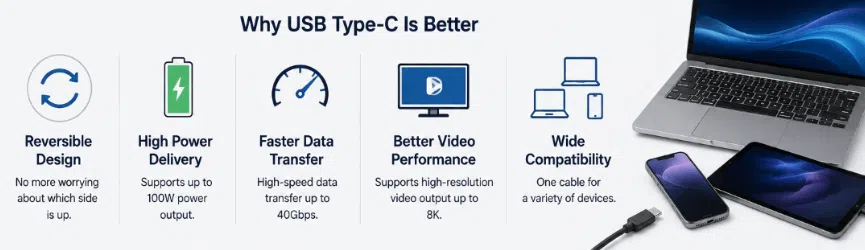
2. Higher Charging Power
One of the most important advantages of USB-C is improved power delivery.
With USB Power Delivery technology, USB-C can support:
20W smartphone charging
45W tablet charging
65W laptop charging
100W professional charging
Up to 240W charging with USB PD Extended Power Range
This allows one USB-C charger to power multiple devices.
For example:
A 100W USB-C charger can support:
Smartphones
Tablets
Laptops
Portable monitors
3. Faster Data Transfer
USB-C supports much faster data transfer compared with older USB interfaces.
Depending on the cable specification, users can transfer:
Photos
Videos
Documents
Large professional files
However, the connector itself does not determine speed.
The cable must support the correct USB standard.
For example:
A USB-C cable designed only for USB 2.0 will not provide USB4 performance.
4. Video Transmission Capability
Another advantage of USB-C is video output support.
Compatible USB-C ports can transmit video signals through:
DisplayPort Alternate Mode
Thunderbolt technology
Applications include:
External monitors
Professional displays
Docking stations
Workstations
This makes USB-C especially popular among laptop users.
USB Type-C vs Previous USB Connectors
| Feature | USB Type-C | Micro USB | USB-A |
|---|---|---|---|
| Connector Design | Reversible | One Direction | One Direction |
| Size | Compact | Small | Large |
| Charging Power | Higher | Lower | Medium |
| Data Speed | Faster Options | Limited | Medium |
| Modern Device Support | Excellent | Declining | Legacy |
USB-C provides better performance and flexibility, making it the preferred connector for new electronic products.
What Devices Use USB Type-C?
USB Type-C is now widely adopted across many product categories.
Smartphones
Many modern smartphones use USB-C for:
Charging
Data transfer
Accessories
Tablets and iPads
USB-C is used for:
Charging
External accessories
Display connections
Laptops
Many modern laptops use USB-C for:
Power input
Data transfer
External monitors
Examples:
MacBook series
Dell laptops
Lenovo ThinkPad
HP laptops
Other Electronics
USB-C is also found in:
Gaming consoles
Wireless headphones
Cameras
Power banks
Car accessories
Portable monitors
Why Is USB-C Becoming the Universal Connector?
USB-C adoption continues to grow because it provides several advantages.
One Connector for Multiple Functions
A single USB-C port can support:
Charging
Data transfer
Video output
This reduces the need for multiple connection types.
Better User Convenience
Consumers benefit from:
Fewer cables
Easier connections
Universal chargers
Industry Standardization
Major technology manufacturers have adopted USB-C because it provides a common solution for modern devices.
The European Union also introduced regulations requiring many electronic devices sold in Europe to adopt USB-C charging interfaces starting in 2024, accelerating worldwide adoption.
What Should Consumers Know About USB-C?
For most everyday users, the important benefits of USB-C are simple:
Easier Connection
No more searching for the correct plug direction.
Faster Charging
Compatible USB-C chargers and cables provide higher charging performance.
Faster Data Transfer
USB-C supports modern high-speed communication standards.
Better Compatibility
One cable can support multiple types of devices.
USB-C Cable Selection Guide
When choosing a USB Type-C cable, consider:
Charging Requirements
Check:
Required wattage
Charger output
Device compatibility
Examples:
Phones: 20W–45W
Tablets: 30W–60W
Laptops: 65W–140W
Cable Quality
A reliable USB-C cable should include:
High-quality copper conductors
Durable connectors
Proper insulation
Safety testing
Data Requirements
Choose based on:
Charging only
File transfer
Video applications
USB-C Cable Manufacturing and OEM Solutions
As USB-C becomes the standard interface worldwide, brands and distributors increasingly require customized cable solutions.
Professional USB-C cable manufacturers provide:
Custom lengths
Custom materials
Private label branding
OEM packaging
Bulk production
These solutions support:
Electronics brands
Retail companies
Amazon sellers
Global distributors
Frequently Asked Questions About USB Type-C
What does Type-C mean?
Type-C refers to the physical USB connector design that provides a smaller reversible interface for modern devices.
Is USB-C the same as Type-C?
Yes. USB-C and USB Type-C refer to the same connector standard.
Why is USB-C better than Micro USB?
USB-C provides:
Reversible connection
Higher charging power
Faster data transfer
Better compatibility
Does every USB-C cable support fast charging?
No. Charging performance depends on cable specifications, charger power, and device support.
Can USB-C replace other connectors?
USB-C can replace many older charging and data connectors, but compatibility depends on device design and supported functions.
Conclusion: USB Type-C Is the Future of Device Connectivity
The Type-C interface has become one of the most important technology standards in modern electronics.
Its reversible design, high-power charging capability, fast data transmission, and wide compatibility make it the preferred connector for smartphones, tablets, laptops, and many other devices.
For consumers, USB-C provides a simpler and more convenient experience.
For manufacturers and brands, USB-C creates opportunities to develop advanced charging products, customized cables, and OEM solutions for global markets.
As adoption continues worldwide, reliable USB Type-C cables will remain an essential part of the future digital ecosystem.
