















Introduction
Modern laptops, monitors, external SSDs, and professional workstations increasingly rely on USB-C connections for high-speed data transfer, video output, and charging. However, not every USB-C cable can achieve Thunderbolt 3 or Thunderbolt 4 performance.
Many users purchase a USB-C cable expecting high-speed performance but encounter problems such as:
External SSD transfer speeds are much slower than expected
4K or 8K monitors fail to work properly
Laptop docking stations disconnect frequently
Devices only operate at basic USB speeds
The reason is that USB-C describes the connector shape, not the actual performance standard.
A USB-C cable may support:
Basic charging only
USB 2.0 data transfer
USB 3.2 high-speed transfer
USB4
Thunderbolt 3
Thunderbolt 4
A true Thunderbolt 3 USB-C cable or Thunderbolt 4 USB-C cable requires advanced internal construction, higher bandwidth capability, and strict performance control.
For US consumers, IT professionals, and electronics brands, selecting the correct high-speed USB-C cable requires understanding:
Bandwidth specifications
Cable architecture
Signal integrity
Active and passive cable design
Device compatibility
A professional USB-C cable manufacturer must optimize electrical performance, shielding, conductor structure, and manufacturing consistency to achieve reliable high-speed transmission.
Material Science & Electrical Performance
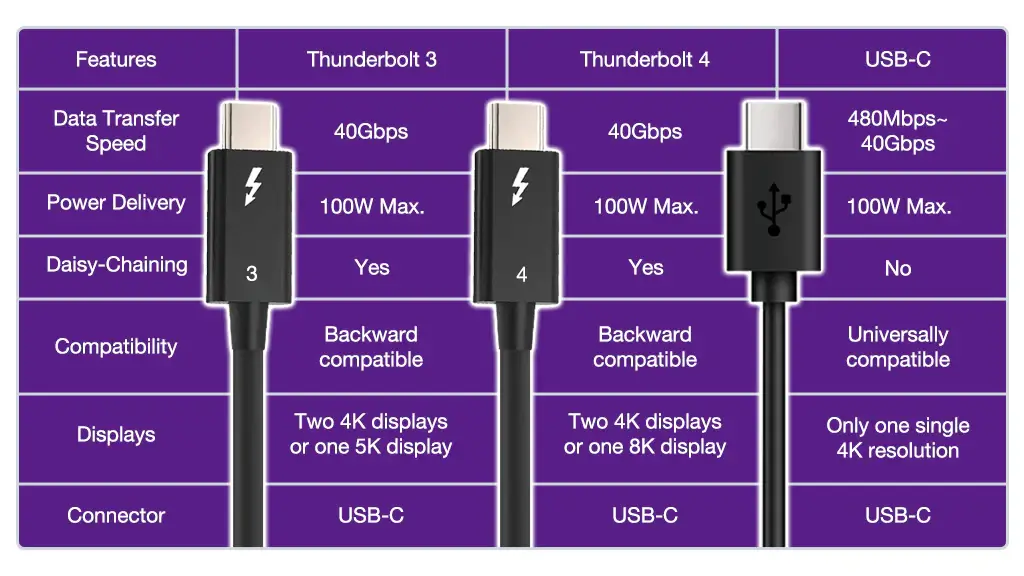
USB-C Connector Does Not Equal Thunderbolt Performance
One of the most common misunderstandings is:
USB-C connector ≠ Thunderbolt capability
USB-C is a physical connector standard.
Thunderbolt is a high-performance data transmission technology developed by Intel.
A USB-C cable can look identical externally but have completely different internal specifications.
| Cable Type | Maximum Data Speed |
|---|---|
| USB 2.0 USB-C Cable | 480 Mbps |
| USB 3.2 Gen 1 USB-C Cable | 5 Gbps |
| USB 3.2 Gen 2 USB-C Cable | 10 Gbps |
| USB4 Cable | Up to 40 Gbps |
| Thunderbolt 3 Cable | Up to 40 Gbps |
| Thunderbolt 4 Cable | Up to 40 Gbps |
Thunderbolt 3 USB-C Cable Requirements
Thunderbolt 3 uses the USB-C connector and supports:
Up to 40Gbps data transfer
Dual 4K display support
External GPU applications
High-speed storage devices
Laptop docking stations
A compatible cable requires:
High-quality conductor structure
Advanced shielding
Signal integrity control
Applications include:
Professional video editing
Gaming laptops
Workstations
External NVMe storage
Thunderbolt 4 USB-C Cable Requirements
Thunderbolt 4 maintains the 40Gbps bandwidth of Thunderbolt 3 but introduces stricter requirements.
Benefits include:
Improved compatibility
Better security features
Support for advanced docking systems
Typical applications:
Professional laptops
Multi-monitor setups
High-performance workstations
A Thunderbolt 4 USB-C cable must meet more demanding certification requirements compared with standard USB-C cables.
Passive vs Active Thunderbolt Cables
Cable design plays an important role in achieving high-speed performance.
Passive USB-C Thunderbolt Cable
Passive cables use traditional conductor structures.
Advantages:
Lower cost
Simple structure
Better flexibility
Limitations:
High-speed performance usually limited by length
Common lengths:
0.5m
0.8m
1m
Active USB-C Thunderbolt Cable
Active cables include electronic components to improve signal quality.
Advantages:
Longer high-speed transmission distance
Better signal stability
Applications:
Professional workstations
Conference rooms
Studio environments
Limitations:
Higher production complexity
Higher cost
Cable Length and Thunderbolt Performance
Length is one of the biggest factors affecting high-speed USB-C performance.
| Cable Length | Typical Application |
|---|---|
| 0.5m | Maximum performance |
| 1m | Desktop connection |
| 2m | Flexible workstation use |
| Longer lengths | Usually require active design |
As cable length increases:
Signal attenuation increases
Transmission difficulty increases
Shielding requirements increase
A standard long USB-C cable may charge devices but fail to achieve Thunderbolt speeds.

Internal Structure of High-Speed USB-C Cables
A high-performance USB-C data cable requires several layers.
| Component | Function |
|---|---|
| Copper conductors | Transfer data signals |
| Shielding layer | Reduces electromagnetic interference |
| Insulation | Maintains signal quality |
| Drain wire | Improves grounding |
| Outer jacket | Protects cable structure |
For professional applications, cable design focuses on:
Signal consistency
Impedance control
EMI protection
Mechanical durability
Braided Thunderbolt-Compatible USB-C Cable Design
A braided USB-C cable is commonly selected for premium markets because it provides:
Better abrasion resistance
Improved durability
Premium appearance
However, achieving Thunderbolt-level performance requires more than adding a braided jacket.
The internal structure must also support:
High-frequency signal transmission
Stable impedance
Effective shielding
Applications Requiring Thunderbolt-Speed USB-C Cables
Professional Video Editing
Video professionals use high-speed USB-C cables for:
External SSDs
4K/8K video workflows
Large media transfers
Gaming Systems
Gaming users require:
Fast external storage access
High-resolution displays
Docking connectivity
Laptop Docking Stations
Thunderbolt docking stations often connect:
Monitors
Ethernet
Storage devices
Peripherals
A standard USB-C cable may not provide full functionality.
Business Workstations
Enterprise users need:
Reliable connections
Multi-device support
Stable data transmission
Case Study
US Professional Computing Brand Developed High-Speed USB-C Cable for Thunderbolt Docking Systems
A US computer accessory company planned to launch a premium cable designed for professional laptop docking stations.
Their previous USB-C cable created customer complaints:
External monitors disconnected
SSD transfer speeds were inconsistent
Docking stations failed to recognize devices
Customer Requirements
The brand required:
40Gbps data transmission capability
Compatibility with Thunderbolt docking systems
Premium braided appearance
Stable bulk production
Target applications:
Professional workstations
Laptop accessories
Enterprise users
Engineering Problems
OSKO analyzed the original cable.
Signal Issues
Problems included:
Poor shielding design
Signal interference
Unstable high-speed transmission
Mechanical Issues
The cable required:
Better bending resistance
Stronger connector protection
OSKO Engineering Solution
OSKO optimized the cable structure.
Electrical Design
Implemented:
Improved shielding structure
High-quality conductor arrangement
Signal stability optimization
Mechanical Design
Added:
Durable braided outer jacket
Reinforced connector housing
Improved strain relief
Quality Testing
Testing included:
| Test | Purpose |
|---|---|
| Data speed test | Verify bandwidth |
| Signal stability test | Confirm reliability |
| Bending test | Evaluate lifespan |
| Connector test | Check durability |
Project Results
The final product achieved:
Stable high-speed transmission
Improved docking compatibility
Better professional user experience
The project supported:
OEM USB cable manufacturing
ODM USB cable development
Professional USB-C data cable supply
Bulk high-speed cable production
Selection Guide
How to Choose a USB-C Cable for Thunderbolt 3 or 4
Check the Logo and Certification
Look for:
Thunderbolt certification
USB4 compatibility
Manufacturer specifications
Confirm Required Performance
| Requirement | Recommended Cable |
|---|---|
| Phone charging | Standard USB-C cable |
| External SSD | USB4 / Thunderbolt cable |
| 4K monitor | USB4 / Thunderbolt cable |
| Docking station | Thunderbolt 4 cable |
Choose the Correct Length
For maximum speed:
Short passive cables provide better performance
Longer cables may require active technology
OEM Buyer Guide: Selecting a High-Speed USB-C Cable Supplier
For brands developing Thunderbolt-compatible products, supplier capability is essential.
A professional manufacturer should provide:
High-speed testing capability
Signal integrity control
Custom cable development
Material optimization
Certification support
OSKO provides:
USB-IF compliant Type C cable manufacturer
Heavy duty braided USB-C cable manufacturer
Durable nylon braided Type C charging cable factory
OEM ODM custom length USB C cables
Bulk custom color braided charging cables
ISO9001 certified braided USB cable factory wholesale
FCC approved nylon braided USB C cable supplier
FAQ
Can every USB-C cable support Thunderbolt 4 speeds?
No. Most USB-C cables only support charging or basic data transfer. Thunderbolt requires specific internal design and certification.
Is USB4 the same as Thunderbolt 4?
USB4 and Thunderbolt 4 share similar maximum bandwidth capabilities, but Thunderbolt 4 has additional requirements and certification standards.
Can a Thunderbolt cable charge a laptop?
Yes. Many Thunderbolt cables support USB-C Power Delivery, depending on their specifications.
Does cable length affect Thunderbolt speed?
Yes. Longer cables create greater signal challenges and may require active technology.
Are braided USB-C cables always high-speed?
No. Braided protection improves durability but does not automatically guarantee Thunderbolt performance.
Summary
Selecting a USB-C cable for Thunderbolt 3 or Thunderbolt 4 requires understanding that connector type alone does not determine performance.
The key factors include:
Data bandwidth capability
Cable certification
Internal conductor design
Shielding structure
Cable length
Signal integrity
For general charging, standard USB-C cables are sufficient.
For professional applications involving:
External SSDs
High-resolution displays
Docking stations
Workstations
a certified high-speed USB-C cable is required.
OSKO provides engineered USB-C cable solutions for professional, commercial, and OEM applications, combining advanced materials, testing processes, and scalable manufacturing capability.
